
Free Fake WhatsApp Chat Generator
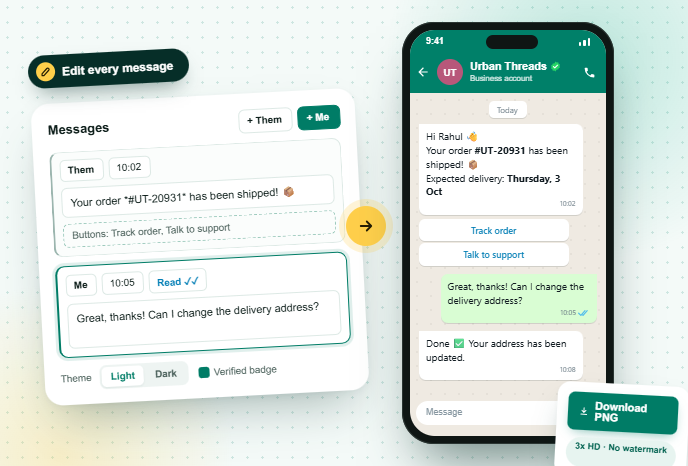
Create a realistic WhatsApp conversation mockup for ads, landing pages, tutorials and presentations. Edit every message, tick and timestamp, add images and buttons, then download a PNG.
How to make a fake WhatsApp chat in 4 steps
From blank screen to a ready-to-use mockup in a couple of minutes.
1️⃣
Pick a starting template
Start from an order update, sales enquiry, support chat or friends chat, or begin blank.
2️⃣
Set the contact
Add a name, status line and profile photo. Turn on the verified badge for a business look.
3️⃣
Write the conversation
Add messages from Them and Me, set times and ticks, attach images and add up to 3 quick reply buttons.
4️⃣
Download the PNG
Export the screen in high resolution, with or without a phone frame, ready for your ad or slide.
What is a fake WhatsApp chat generator?

Marketers use chat mockups to show a product experience before it exists: how an order update, abandoned cart reminder or support reply will look on a customer’s phone. Educators use them to teach online safety, and creators use them in videos and memes.
This generator is built for business use. It supports message buttons, images, a verified badge and WhatsApp-style *bold* and _italic_ formatting, so you can mock up real WhatsApp Business conversations for pitches and creatives.
The output is an image only. Nothing is sent, nothing is stored, and the chat is not connected to any WhatsApp account.
What you can customise
| Contact | Name, photo, status, verified badge |
| Messages | Sent and received, formatting, images |
| Business | Up to 3 quick reply buttons per message |
| Details | Time, read, delivered, sent, sending |
| Extras | Date dividers, system notes |
| Phone | Clock, battery, light or dark theme |
| Background | Pattern, solid color or your image |
| Export | 3x PNG, with or without phone frame |
Who uses a WhatsApp chat mockup
Chat mockups sell ideas faster than any slide of text.
Performance marketers
Show a real-looking conversation in Click-to-WhatsApp ads and Instagram creatives. Chat screenshots often feel more native than polished banners.
Product and growth teams
Preview order updates, reminders and support flows for stakeholders before you build templates.
Agencies and freelancers
Pitch WhatsApp campaigns to clients with visuals of exactly what their customers will receive.
Landing pages and case studies
Illustrate how customers talk to your brand, with names and details anonymised.
Teachers and trainers
Build examples for customer service training or online safety lessons without exposing real chats.
Content creators
Make story-driven reels, skits and memes with complete control over every line.
For growing businesses
Liked the mockup? Now send the real thing.
Everything in your mockup, from order updates to buttons, can be sent to real customers with GreenTick on the official WhatsApp Business Platform.
- Template Manager for Meta-approved templates with buttons
- Bulk Broadcast and Campaign Manager for launches and offers
- Automations and AI Bot to reply instantly
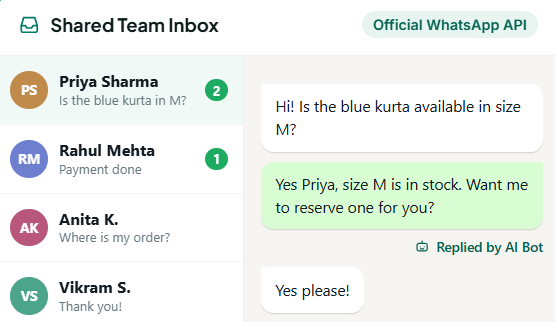
- Shared Team Inbox for your whole team
Tips for a realistic chat mockup
The details that make a mockup believable, and honest.
Keep timestamps logical
Replies should come a minute or two after the question, not before it.
Use real-looking names
Common first names read more natural than "Customer 1". Never use a real person's identity without permission.
Mix message lengths
Real chats combine one-word replies with longer messages.
Use the verified badge only for your own brand
Showing it on another company's name can mislead viewers.
Match your brand theme
Dark mode mockups stand out on light web pages and vice versa.
Label it in ads if needed
Some ad policies expect clear labeling when a screenshot is illustrative. Add "Illustrative example" in the caption.
Fake WhatsApp chat generator FAQs
How do I create a fake WhatsApp chat?
Choose a template in the generator above, set the contact name and photo, edit or add messages from both sides, then click Download PNG to save the chat as an image.
Is this fake WhatsApp chat generator free?
Yes. It is completely free, with no signup, no watermark and no limit on how many chats you create.
Can I add images and buttons to the fake chat?
Yes. Every message can have an image attached, and you can add up to 3 quick reply buttons below any message to mock up WhatsApp Business template messages.
Does it support dark mode?
Yes. Switch the Theme to Dark to create a dark mode WhatsApp chat screenshot.
Can the other person see the fake chat?
Is it legal to make a fake WhatsApp chat?
Do you save my chats or photos?
WHATSAPP BUSINESS API
The Meta Verified WhatsApp API that doesn't tax for growing
Get started today.
* No Credit Card Required
✅ Bulk Broadcast
✅ Mobile Dashboard Access
✅ Shared Team Inbox
✅ Automated Workflow Engine
✅ AI Chat Bot
✅ Personalised Messaging
✅ Scheduled Campaign
✅ Coexistence