
Resolve customer queries faster
from one shared WhatsApp inbox
Your whole team answers from one number. An AI Bot handles the repeat
questions around the clock, and in-chat forms collect the details before an
agent steps in. All on the official Meta WhatsApp Cloud API.
* No credit card required.

One number
your whole team replies together
24/7 AI Bot
answers the repeat questions for you
No Meta charge
on replies inside the 24-hour window
7 days free
every tool unlocked, no card needed
Trusted by smart businesses making the switch.






Three ways WhatsApp
support breaks as you grow
Customers love messaging you on WhatsApp. The trouble starts when one phone has to serve all of them, and each problem has a fix inside GreenTick.
One phone, too many hands
Support runs from a single phone or a shared login. Nobody knows who replied, some chats get answered twice, and others are missed entirely.
GreenTick fix
A shared inbox where every chat has an owner and your team can leave internal notes.
The same questions, all day
Opening hours, prices, availability, delivery areas. Your agents spend their day typing answers they have typed a hundred times before.
GreenTick fix
The AI Bot answers repeat questions 24/7 and hands over when a human is needed.
5 messages to get 1 detail
Every complaint starts with the same back-and-forth for a name, an order number and what went wrong, before anyone can actually help.
GreenTick fix
A WhatsApp Flow collects every
detail in one in-chat form before
an agent replies.
Shared Team Inbox
One WhatsApp number. Your whole team. Full context on every chat.
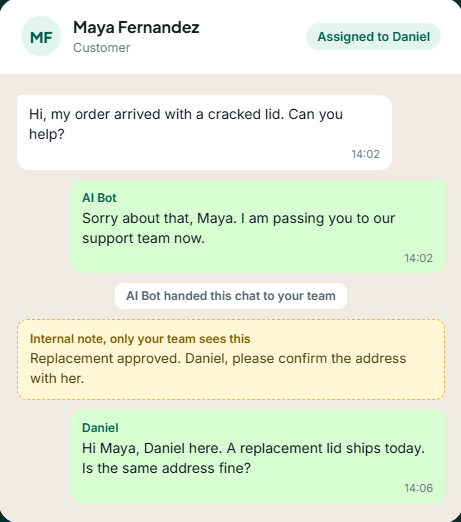
Every incoming message lands in Live Chat, where each agent works from their own screen. No passing a phone around, and no guessing who is handling what.
- All agents reply from one WhatsApp number
- Assign conversations to specific team members
- Internal notes that only your team sees
- Real-time sync across every logged-in agent
- Full conversation history for every contact
What support costs on WhatsApp
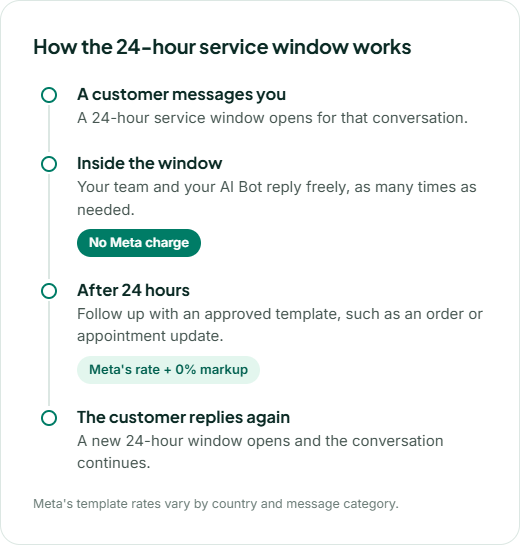
Replying to customers carries no Meta charge. Updates go out at Meta's rate.
When a customer messages you first, a 24-hour service window opens. Your replies inside it are free-form, and Meta does not charge for them. Once the window closes, you need an approved template to message again, and GreenTick adds 0% markup to what Meta charges for it.
Your GreenTick platform plan is billed separately as a flat subscription. See GreenTick pricing
From first message to
resolved, in one dashboard
Each stage of a support conversation has a tool built for it. Real screens, not mockups.
A first reply in
seconds, even at 2 am
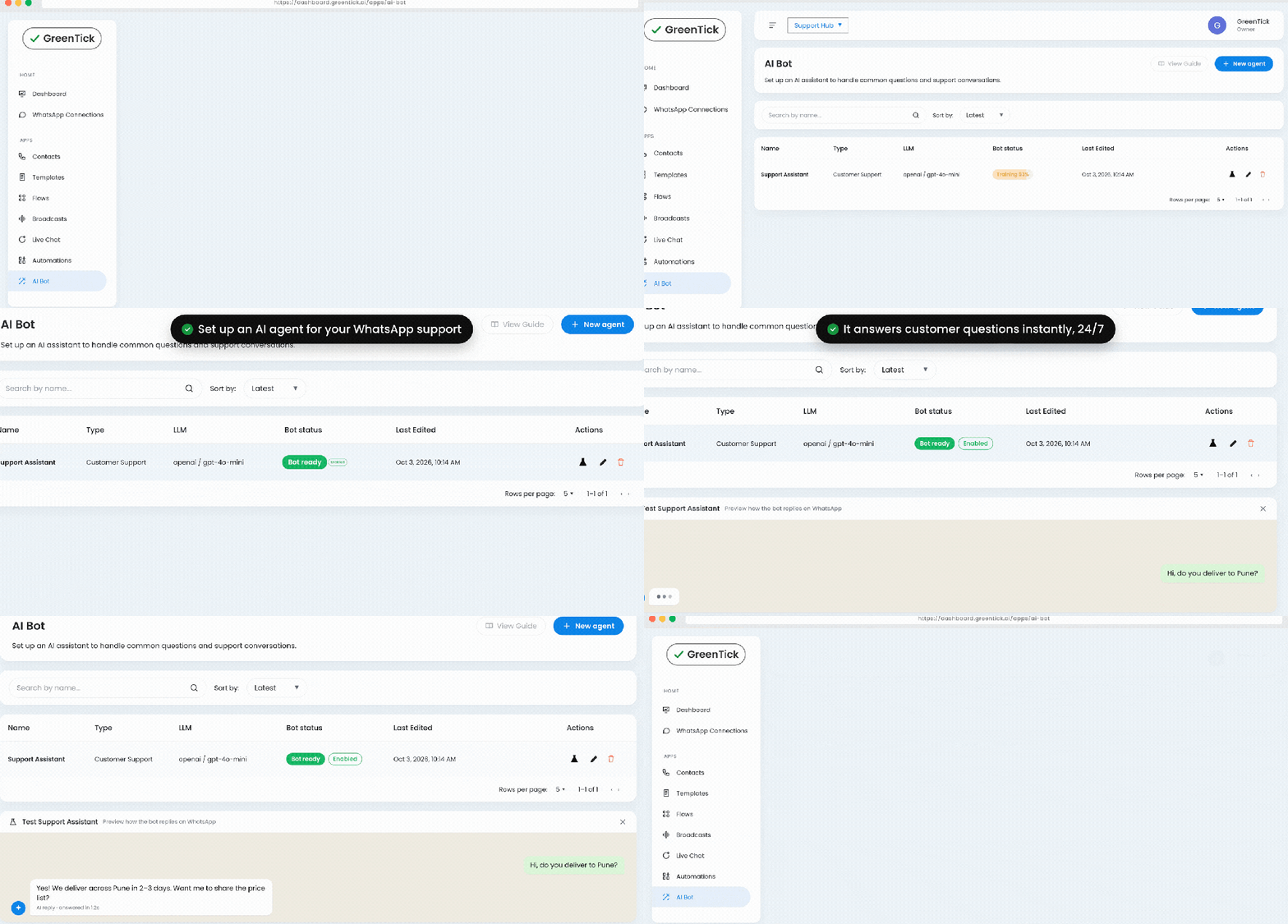
Set up an AI assistant trained on your business and let it handle the questions your team answers every day.
- Answers questions on hours, pricing, availability and products
- Hands the chat to a human when the conversation needs one
- Keyword automations reply to common messages instantly
- Enable, disable or switch bots from the dashboard
AI Chat Bot
Automations

Get every detail in one form, not ten messages
WhatsApp Flows open a form inside the chat, so customers share what you need without leaving WhatsApp.
- Complaint, return and booking forms inside the chat
- Collect names, order numbers and issue details up front
- No links to outside forms or websites
- Keep customers organised with labels and custom attributes
Flows
Contacts
The right agent,
with the full story
When a person is needed, the chat goes to someone who can see everything that came before it.
- Assign each conversation to a specific teammate
- Leave internal notes for the next agent
- See the full conversation history for the contact
- Reply from any mobile browser when you are away from your desk
Manage Team
Contacts
Live Chat


Keep customers informed before they have to ask
The easiest support request is the one that never gets raised. Send order, payment and appointment updates automatically.
- A status change in your Google Sheet sends the right template
- Developer API triggers updates from your website, CRM or app
- Templates built in Meta's exact format, with live approval status
- Sends log with delivery status and duplicate protection
Google Sheet Integration
Developer API
Templates
More that helps your support team
The rest of the toolkit behind every conversation.
Number Coexistence
Keep the WhatsApp Business app on the same number while campaigns run from GreenTick.
Mobile access
Check campaigns and reply to customers from any mobile browser.
Template Manager
Build templates in Meta's exact format and see Pending or Approved status live.
Contact Management
Labels, custom attributes and full conversation history for every contact.
Automations
Trigger replies on keywords, new contacts or specific events, and track every run.
Manage Team
Bring your support agents into one account on one WhatsApp number.
Click to Chat Widget
Add a free WhatsApp chat button to your website. Get the widget
WhatsApp QR Code
Print a code on packaging or receipts that opens a chat with your team. Create a QR code
Put your whole team on one WhatsApp number this week
Every tool on this page is unlocked for 7 days. No credit card required.
Support conversations
GreenTick handles every day
Pick a situation to see how it plays out in the chat.
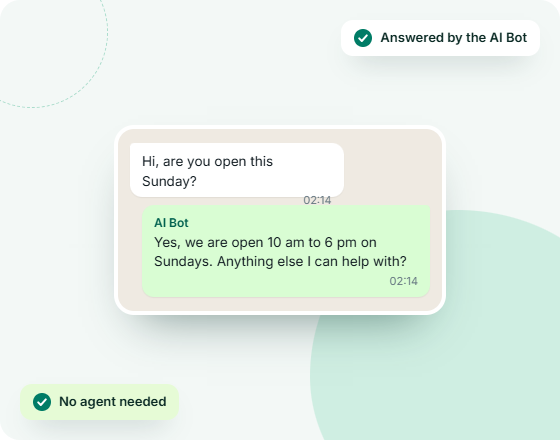
Hours, prices, availability
Common questions, answered around the clock
Most support messages are the same handful of questions. Train the AI Bot on your business once and it answers them at any hour.
- AI assistant trained on your own business details
- Handles hours, pricing, availability and product questions
- Hands the chat to a human when it needs one
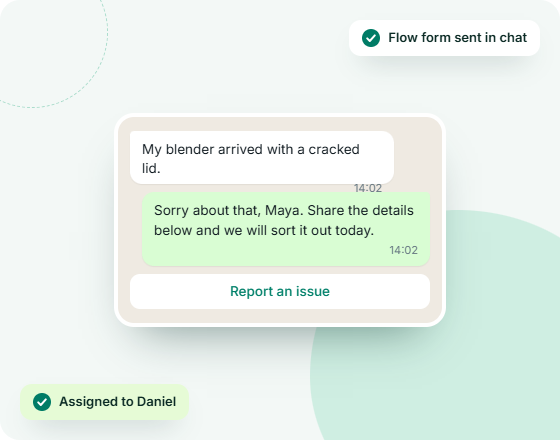
Damaged, wrong or late
Complaints and returns without the back-and-forth
A complaint should not start with five messages asking for basics. Send one in-chat form, then pass the full picture to the right agent.
- A WhatsApp Flow collects the order number and the issue
- Assign the chat to the teammate who handles returns
- Internal notes keep your team aligned behind the scenes
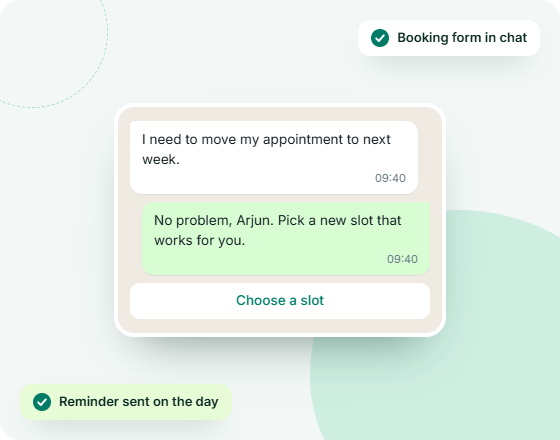
Clinics, salons, service teams
Bookings and rescheduling inside the chat
Let customers book or move an appointment without a phone call, and remind them automatically so fewer slots go empty.
- Booking and rescheduling forms built with WhatsApp Flows
- Reminders sent from your Google Sheet on the date
- An agent can step in from Live Chat at any point
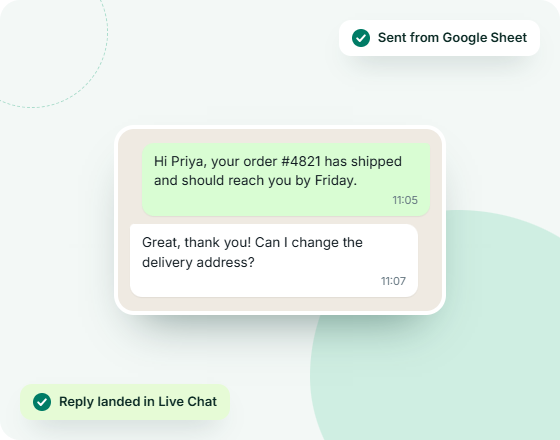
Orders, payments, deliveries
Status updates that stop "where is my order" messages
Tell customers what is happening before they ask. When they do reply, the conversation lands with your team, not in a dead end.
- A status change in your sheet sends the right template
- Developer API triggers updates from your store or CRM
- Customer replies arrive in your shared inbox
Set up WhatsApp support in four steps
No developer and no IT team. Set up in one afternoon.
1️⃣
Connect your number
Link your WhatsApp Business Account from the dashboard. You can keep your existing number. Setup guide
2️⃣
Add your team
Open Manage Team and bring your agents into the account, so everyone replies from their own screen.
3️⃣
Set up your AI Bot
In AI Chat Bot, create an assistant trained on your business to handle the common questions.
4️⃣
Reply from Live Chat
Open Live Chat to see every conversation, assign chats to teammates and add internal notes.
WhatsApp customer support
questions, answered
Can multiple agents use one WhatsApp number?
Yes. With GreenTick, every incoming message lands in a shared inbox, and each agent on your account can see it, reply to it and manage it from their own screen, all on the same WhatsApp number.
Is WhatsApp customer support free?
Replies are free of Meta charges when the customer messages you first. That message opens a 24-hour service window, and your replies inside it carry no Meta charge. After the window closes you need an approved template, which Meta charges for. GreenTick adds 0% markup to that charge, and your platform plan is a separate flat subscription.
What is the WhatsApp 24-hour customer service window?
It is the 24 hours after a customer last messaged your business. Inside that window you can send free-form replies. Once it closes, any message you start must use a template approved by Meta. A new window opens each time the customer replies.
Can a WhatsApp chatbot hand over to a human agent?
Yes. The GreenTick AI Bot answers common questions on its own, and when the conversation needs a person it hands the chat to your team in Live Chat.
How do I collect customer details on WhatsApp?
Use WhatsApp Flows. A Flow opens a form inside the chat, so the customer can share details such as their name, order number and issue in one step without leaving WhatsApp.
Can I keep my existing WhatsApp Business number for support?
Yes. With Coexistence, your number keeps working on the WhatsApp Business app on your phone and also works from the GreenTick dashboard at the same time.
Can I reply to customers from my phone?
Yes. Open GreenTick in any mobile browser to read and reply to customer chats. There is no app to install.
WHATSAPP BUSINESS API
The Meta Verified WhatsApp API that doesn't tax for growing
Get started today.
* No Credit Card Required
✅ Bulk Broadcast
✅ Mobile Dashboard Access
✅ Shared Team Inbox
✅ Automated Workflow Engine
✅ AI Chat Bot
✅ Personalised Messaging
✅ Scheduled Campaign
✅ Coexistence