
Free Fake WhatsApp Chat List Generator
Create a realistic WhatsApp home screen with your own contacts, last messages, unread badges, pins and ticks. Perfect for ads that show a flooded inbox. Download as PNG.

How to make a fake WhatsApp chat list in 4 steps
Build a believable inbox screen in minutes.
1️⃣
Pick a template
Start with a busy business inbox, a launch day rush, a personal list or a blank screen.
2️⃣
Edit each chat
Change the name, photo, last message, time and unread count. Mark chats as pinned, muted or typing.
3️⃣
Style the screen
Set the phone time and battery, switch light or dark mode, and choose the active filter chip.
4️⃣
Download
Export a high resolution PNG, with or without the phone frame.
What is a fake WhatsApp chat list generator?

A single chat shows one conversation. A chat list shows volume: dozens of customers asking about a product, a group buzzing after a launch, or a support queue piling up. That is why it is one of the most used visuals in WhatsApp marketing ads.
This generator gives you control over every detail that makes the screen believable: green unread badges, bold green timestamps on unread chats, read and delivered ticks on your own last message, pinned and muted icons, and the typing indicator.
It is an image mockup only. It does not connect to WhatsApp or read any real chats.
Screens that work in ads
| Story | How to build it |
|---|---|
| “Orders are pouring in” | Launch day template, 8+ unread chats, times a minute apart |
| “Never miss a lead” | Busy inbox with high unread counts, then a clean inbox after |
| “Customers love us” | Last messages with thank-yous and emoji, read ticks |
| Before and after | Export the same list twice: unread piled up, then all replied |
Who uses a WhatsApp chat list mockup
When you need to show demand, one screen says it all.
D2C brands
Show social proof: a home screen full of customers asking for your product.
Agencies pitching WhatsApp marketing
Visualise the problem, an overflowing inbox, before selling the solution.
SaaS and product marketers
Illustrate before and after screens for inbox, automation or support tools.
Course creators and coaches
Show demand for your cohort or community with a realistic inquiry screen.
UI designers
Mock up concepts and presentations without screenshots of real personal chats.
Content creators
Build skits, story reels and relatable memes around a busy chat list.
For growing businesses
Is your real inbox looking like this?
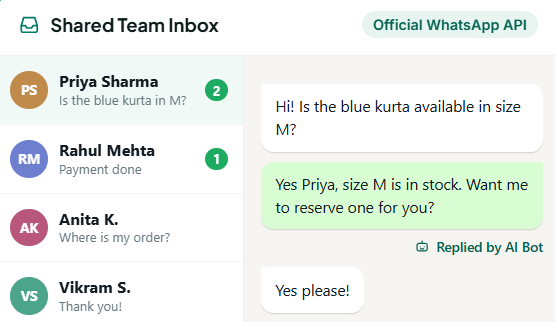
When chats pile up, customers wait and sales slip. GreenTick brings every conversation into one shared inbox with automations that reply instantly, on the official WhatsApp Business Platform.
- Shared Team Inbox, with many agents on one WhatsApp number
- Automations and AI Bot answer common questions 24/7
- Contact Management to tag and segment every customer
- Bulk Broadcast to follow up with opted-in contacts
Tips for a believable chat list
Realism comes from small, messy details.
Stagger the times
Newest at the top, a minute or a few apart. Use Sort by time to fix the order.
Vary unread counts
A mix of 1, 2, 3 and one big group number reads more natural than all 1s.
Use short previews
Real previews are cut off after one line. Keep them to a few words.
Add a pinned chat or two
Most people pin family or key clients. It adds realism.
Use photos for some, initials for others
Not everyone has a profile photo. Mixing both looks authentic.
Do not copy real people
Invent names and photos, or get permission. Never recreate someone's real chat list.
Fake WhatsApp chat list generator FAQs
How do I create a fake WhatsApp chat list?
Pick a template in the generator above, edit each chat’s name, photo, last message, time and unread count, then click Download PNG to save the home screen as an image.
Is the fake WhatsApp chat list generator free?
Yes. It is completely free with no signup, no watermark and no limit on chats or downloads.
Can I add unread message counts and pinned chats?
Yes. Every chat has an unread count, plus Pinned, Muted and Typing options. Unread chats get a green badge and green time, just like the real app.
Can I make a dark mode WhatsApp chat list?
Yes. Set Theme to Dark in Screen settings.
Can I upload profile pictures?
Is it safe and legal to use?
WHATSAPP BUSINESS API
The Meta Verified WhatsApp API that doesn't tax for growing
Get started today.
* No Credit Card Required
✅ Bulk Broadcast
✅ Mobile Dashboard Access
✅ Shared Team Inbox
✅ Automated Workflow Engine
✅ AI Chat Bot
✅ Personalised Messaging
✅ Scheduled Campaign
✅ Coexistence