
Free WhatsApp QR Code Generator
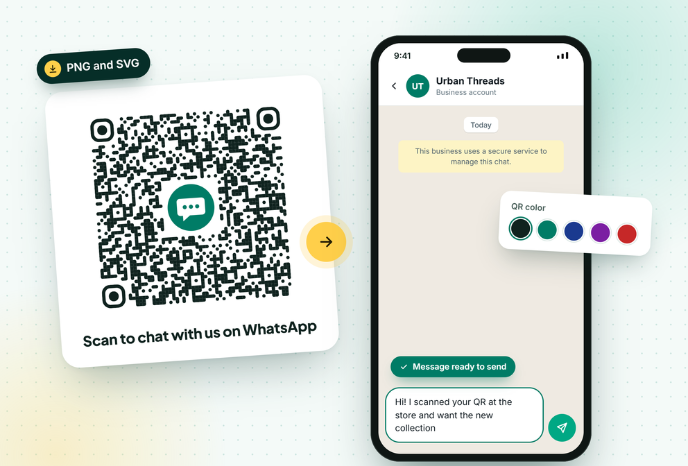
Turn your WhatsApp number into a QR code customers can scan to start a chat. Add a pre-filled message, your logo and brand colors, then download a print-ready PNG or SVG.
Generate your QR Code Now!
How to create a WhatsApp QR code
Four steps, about a minute. No account needed.
1️⃣
Enter your number
Pick your country and type your WhatsApp number without the leading 0. Business app and API numbers both work.
2️⃣
Add a first message
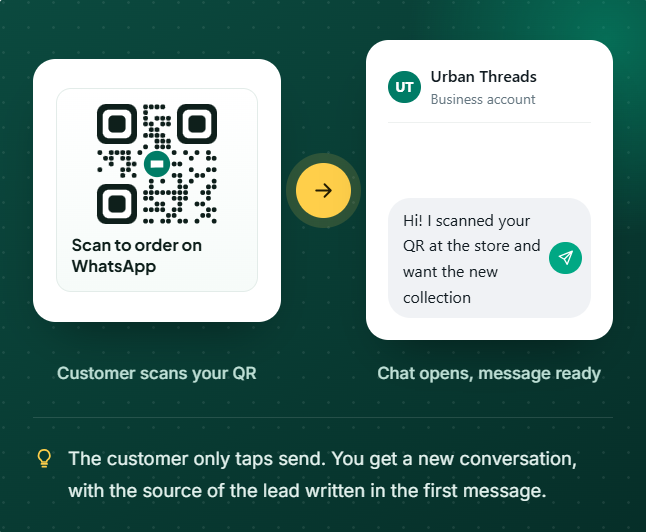
Pre-fill what the customer sends, like the product or offer they scanned, so you know where each lead came from.
3️⃣
Style it
Choose a color, pattern and corners, add your logo in the center and write a short caption like “Scan to order”.
4️⃣
Download and test
Download PNG for digital use or SVG for print. Scan it with two phones before printing in bulk.
One Number, Everyone on Your Team
Nobody has to save your number first. Removing that one step is why QR codes on counters, packaging and flyers turn walk-ins and readers into WhatsApp conversations.
The QR this tool creates is static: the link is stored inside the image. It works forever, costs nothing and has no scan limit. The trade-off is that you cannot change the number or message after printing, so test before you print.
WhatsApp’s own in-app QR only adds you as a contact. This one opens a chat directly and can carry a pre-filled message, which is what you want for marketing.
Where businesses put their WhatsApp QR code
Anywhere a customer can see it but cannot click a link.
Shop counters
Customers scan while they wait. You collect a WhatsApp contact from every walk-in for order updates and future offers.
Product packaging
Put it on the box or label for reorders, usage help or warranty registration. Pre-fill the product name for context.
Restaurant tables and menus
Take orders, reservations and feedback on WhatsApp without a separate app.
Flyers, posters and print ads
Print has no clickable link. A QR turns a static ad into a conversation you can track.
Events and trade shows
Replace paper lead forms. Visitors scan, send the pre-filled message and you have their number.
Invoices and delivery slips
Give customers a fast way to ask about an order, raise a return or leave a review.
For growing businesses
Scans are coming in. Can your team keep up?
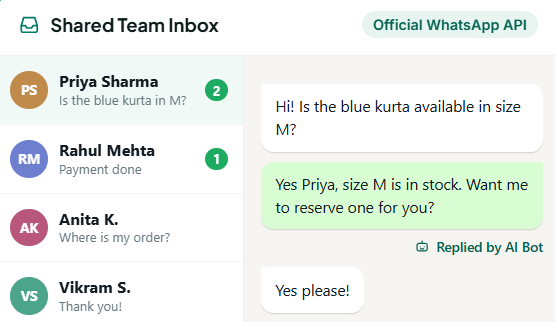
A QR code starts the conversation. GreenTick helps you answer every chat and follow up at scale on the official WhatsApp Business Platform.
- Shared Team Inbox, so every scan gets a reply from any teammate
- Automations and AI Bot answer common questions instantly
- Bulk Broadcast to send offers to contacts who opted in
- Lower markup on Meta fees than most providers
Tips that get more scans
Small details decide whether people scan or walk past.
Tell people why to scan
A bare QR gets ignored. "Scan for today's menu" or "Scan for 10% off" gets scanned.
Keep contrast high
Dark code on a light background. Pastel and light-on-dark codes fail on older phone cameras.
Keep the logo small
The center logo covers data. This tool switches to the highest error correction when a logo is on.
One message per location
Use different pre-filled messages for flyers, packaging and the counter to see which works.
Leave white space
The quiet zone around the code matters. Do not print text or borders right up to the edges.
Test before bulk printing
Scan with an Android phone and an iPhone, in normal light, from the real distance.
WhatsApp QR code FAQs
How do I create a QR code for my WhatsApp number?
Enter your country code and WhatsApp number in the generator above, add an optional pre-filled message, then download the QR as PNG or SVG. Anyone who scans it opens a chat with you in WhatsApp.
Is this WhatsApp QR code generator free?
Yes. It is 100% free, with no signup, no watermark and no limit on how many QR codes you create or download.
Does a WhatsApp QR code expire?
No. The QR stores a wa.me link directly in the image, so it works as long as your WhatsApp number is active. There is no subscription that can switch it off.
Can I add a pre-filled message to a WhatsApp QR code?
Yes. Type your message in the Pre-filled message box. When someone scans the code, WhatsApp opens the chat with that message ready to send.
Can I add my logo to the WhatsApp QR code?
Does it work with WhatsApp Business and the WhatsApp Business API?
How do I scan a WhatsApp QR code?
Can I change the number after printing the QR code?
WHATSAPP BUSINESS API
The Meta Verified WhatsApp API that doesn't tax for growing
Get started today.
* No Credit Card Required
✅ Bulk Broadcast
✅ Mobile Dashboard Access
✅ Shared Team Inbox
✅ Automated Workflow Engine
✅ AI Chat Bot
✅ Personalised Messaging
✅ Scheduled Campaign
✅ Coexistence