
Reply to every lead in
seconds and close the
sale inside WhatsApp
Capture leads from ads and your website, ask the right questions with
in-chat forms, follow up automatically from your Google Sheet, and let your
team close from one shared inbox. All on the official Meta WhatsApp Cloud API.
* No credit card required.

0% markup
on Meta’s WhatsApp message rates
Ad click to chat
leads message you instead of filling a form
Instant first reply
on Meta’s WhatsApp message rates
7 days free
every tool unlocked, no card needed
Trusted by smart businesses making the switch.






Three places a sale slips
away before you close it
Most lost deals are not lost on price. They are lost in the gaps between the enquiry, the first reply and the follow-up, and each gap has a fix inside GreenTick.
Leads go cold before anyone replies
Someone fills in a form at 9 pm and hears back the next afternoon. By then they have already messaged another business.
GreenTick fix
Ads open a WhatsApp chat, and the
AI Bot replies at once, at any hour.
The first call is spent on basic questions
Your team’s first conversation goes on what the customer needs, their budget and their timing. Real selling starts late, and people who were never going to buy take up the day.
GreenTick fix
A WhatsApp Flow collects the answers in 1 in-chat form before your team steps in.
Follow-ups depend on memory
The quote goes out and nobody checks back. Deals stall because the reminder lived in someone’s head or on a sticky note.
GreenTick fix
Automations and your Google Sheet send the follow-up on the date you set.
WhatsApp Ads
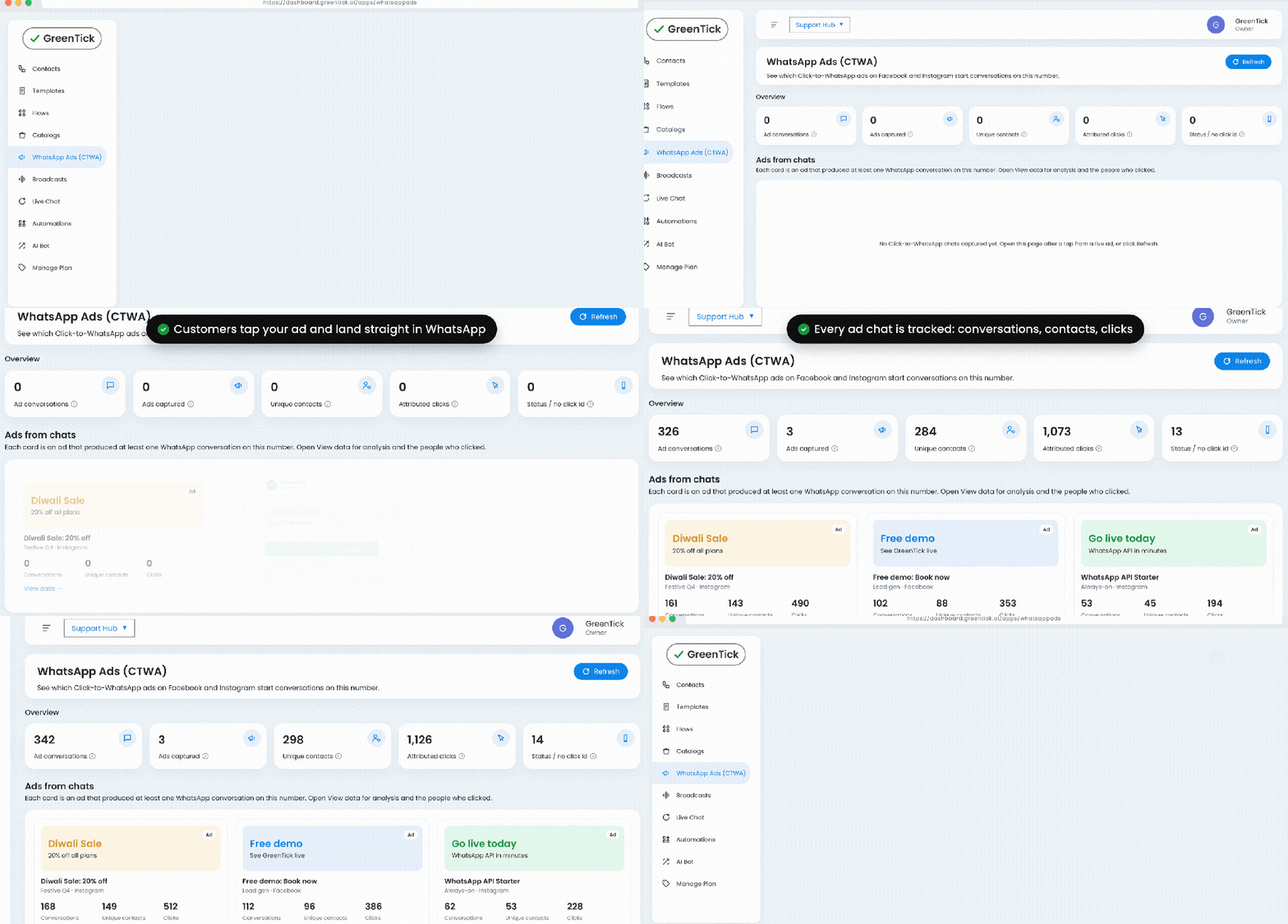
From ad click to a real conversation, with
no form in between
Most ads send people to a landing page and hope they fill in a form. Click-to-WhatsApp ads skip that step. The lead lands in a chat, gets an answer straight away, and reaches your sales team with the details already collected.
- Run click-to-WhatsApp ads on Facebook and Instagram
- Every ad click opens a chat with your business, not a form
- New leads land in your Live Chat inbox, ready for your team
- Follow up with templates, automations or your AI Bot

Google Sheet Integration
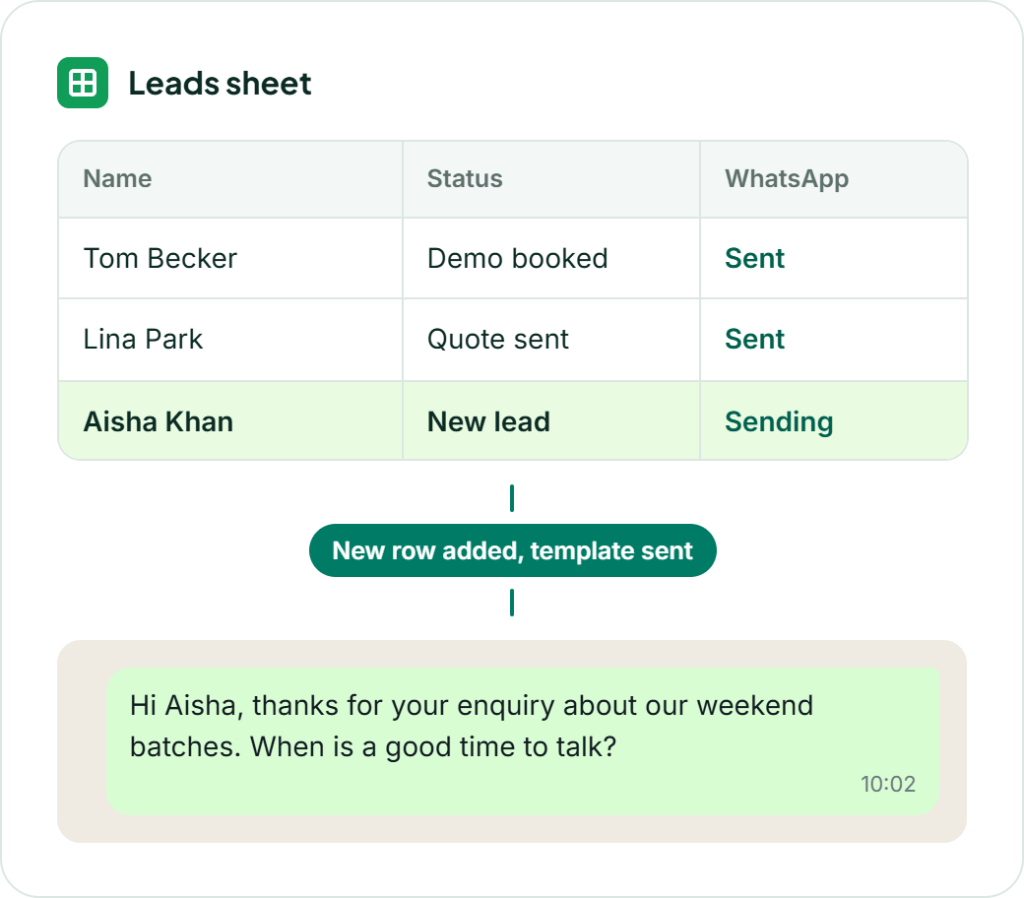
Your lead sheet sends the first message for you
Most sales teams already track leads in a Google Sheet. Connect it to your WhatsApp number with GreenTick’s free add-on, and a new row or a changed status sends the right template to that lead automatically. No code, and no copy-pasting numbers.
- Trigger on a new row, column change, date, schedule or form submit
- Map template variables like name to your sheet columns
- Run up to 20 automation rules per sheet, each with its own on/off switch
- Sends log with delivery status and built-in duplicate protection
Every stage of the
sale, in one dashboard
From the first enquiry to the order, each step has a tool built for it. Real screens, not mockups.
Bring leads in as conversations, not form fills
Give buyers a one-tap way to message you from wherever they find you, and start every lead with a phone number you can reply to.
- Click-to-WhatsApp ads on Facebook and Instagram
- A free click-to-chat button for your website
- A QR code for brochures, packaging and store counters
- Every new lead arrives in your Live Chat inbox
WhatsApp Ads
Live Chat

Find out who is serious
before your team steps in
Let the chat ask the first few questions, so your team spends its time on people who are ready to buy.
- Lead forms inside the chat with WhatsApp Flows
- The AI Bot answers product and pricing questions 24/7
- The bot hands the chat to a human when it needs one
- Group leads with labels and custom attributes
Flows
AI Chat Bot
Contacts
Follow-ups that happen
without a reminder
Set the rule once and the next message goes out on its own, whether that is a welcome, a nudge after a quote or a reminder before a demo.
- Trigger workflows on keywords, new contacts or specific events
- Pre-built templates to get your first automation live in minutes
- A date or status change in your Google Sheet sends the follow-up
- Track executions and completion rates per workflow
Automations
Google Sheet Integration
Templates


Close in the chat your
buyer is already in
Sending a buyer to a website is one more step where you lose them. Put your products in the conversation and let the right person on your team finish the sale.
- Share your WhatsApp Catalog in a template or broadcast
- Customers browse, add to cart and send the order in chat
- Assign each chat to the team member handling that customer
- Internal notes make handovers within your team smooth
Catalog
Live Chat
Manage Team
Send WhatsApp messages from
the tools your team already uses
Google Sheets and the Developer API are available now. The others are on the way.
Google Sheets
Send approved WhatsApp templates from a spreadsheet. Trigger on a new row, a status change, a date, a schedule, or a Google Form response.
Developer API
Send approved WhatsApp templates from your own website, CRM or app with an API key from the dashboard.
HubSpot
Send a WhatsApp template from HubSpot when a contact or deal changes.
Zoho
Send WhatsApp updates from Zoho CRM when a lead or deal moves.
Zapier
Start a WhatsApp template send from a Zap when something happens in another app.
Make
Run a WhatsApp template send as a step in a Make scenario.
n8n
Trigger WhatsApp template messages from an n8n workflow.
MCP server
Connect AI assistants to your GreenTick account through a Model Context Protocol server.
More that helps your sales team
The rest of the toolkit behind every deal.
Template Manager
Build follow-up and reminder templates in Meta's exact format, with live approval status.
Manage Team
Bring your whole sales team into one account on one WhatsApp number.
Developer API
Your website, CRM or app triggers a WhatsApp message the moment a lead signs up.
Shared Team Inbox
Everyone on your sales team replies from one WhatsApp number, with real-time sync across the team.
Number Coexistence
Keep using the WhatsApp Business app on the same number your buyers already know.
Contact Management
Labels, custom attributes and full conversation history for every lead and customer.
WhatsApp Link Generator
A click-to-chat link for your bio, email signature and proposals. Create a link
Mobile access
Reply to leads from any mobile browser when you are out in the field.
Answer your next lead before your competitor does
Every tool on this page is unlocked for 7 days. No credit card required.
Sales conversations GreenTick
moves forward every day
Pick a situation to see how it plays out in the chat.

Ads and website enquiries
New enquiries answered while they are still interested
A lead is most likely to buy in the first few minutes after they reach out. Reply at once, collect the basics, and hand a ready conversation to your sales team.
- Click-to-WhatsApp ads open a chat, not a form
- The AI Bot replies straight away, at any hour
- A WhatsApp Flow collects what your team needs to know
Demos, test drives, site visits
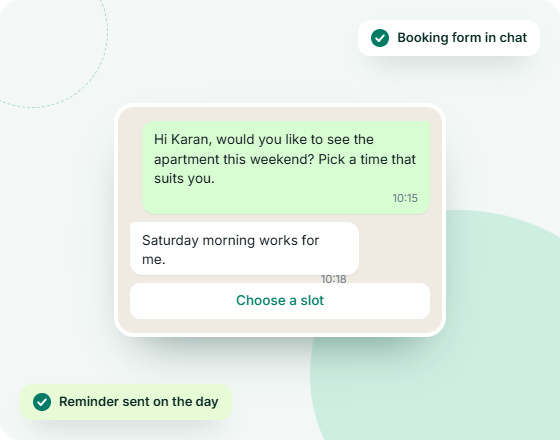
Bookings made in the chat, not over five calls
Getting a buyer to show up is half the sale. Let them pick a slot inside WhatsApp and remind them automatically.
- Booking forms built with WhatsApp Flows
- A reminder goes out from your Google Sheet on the date
- Someone from your team can step in from Live Chat at any point
Quotes and proposals
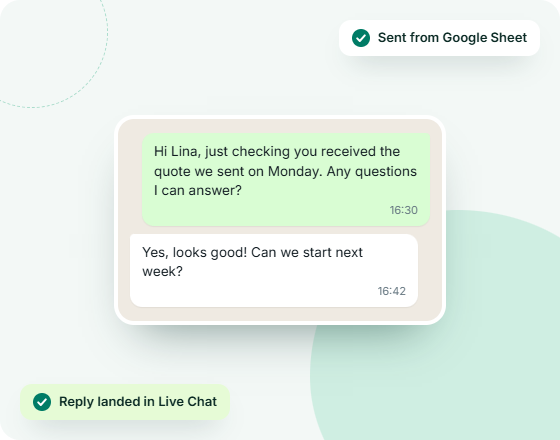
Quote follow-ups that never get forgotten
Deals stall when nobody checks back. Let your lead sheet send the follow-up, and have the reply land with the person handling that customer.
- A date/status in the sheet triggers the follow-up template
- Replies arrive in the shared inbox, assigned to the right person
- Internal notes keep the whole team up to date on the deal

Retail, wholesale, D2C
Orders taken inside the conversation
Every extra step between interest and checkout loses buyers. Put your products in the chat and take the order right there.
- Link your Meta catalog to your WhatsApp number once
- Customers browse, add to cart and send the order in chat
- Manage products from the GreenTick dashboard
Start selling on WhatsApp in four steps
No developer and no IT team. Set up in one afternoon.
1️⃣
Connect your number
Link your WhatsApp Business Account from the dashboard. You can keep your existing number. Setup guide
2️⃣
Bring in your leads
Go to Contacts, then Import, to upload a CSV, or connect your lead sheet with the Google Sheets add-on.
3️⃣
Build your lead form
In Flows, create the in-chat form that asks new leads the questions your team needs answered.
4️⃣
Reply and close
Open Live Chat to see every lead, assign chats to your team and take the conversation to a sale.
WhatsApp sales questions, answered
What are click-to-WhatsApp ads?
Click-to-WhatsApp ads are Facebook and Instagram ads that open a WhatsApp chat with your business when someone taps them, instead of sending the person to a landing page or form. With GreenTick, those leads arrive in your Live Chat inbox so your team can reply right away.
How do I capture leads on WhatsApp?
Give people a one-tap way to message you: click-to-WhatsApp ads, a chat button on your website, or a QR code. Then use a WhatsApp Flow to collect their details in a form inside the chat. Each lead is saved as a contact you can label and follow up.
Can I send WhatsApp messages automatically from Google Sheets?
Yes. GreenTick’s free Google Sheets add-on connects your sheet to your WhatsApp number. A new row, a column change, a date, a schedule or a form submit can each trigger an approved template to the right contact, with a log of every send.
Can my whole sales team use one WhatsApp number?
Yes. Every incoming message lands in a shared inbox, and each team member on your account can reply from their own screen on the same number. You can assign conversations to specific people and leave internal notes.
Can customers place orders on WhatsApp?
Yes. Link your Meta catalog to your WhatsApp number in GreenTick and turn on the shopping cart. Customers can browse your products, add them to a cart and send you the order from the same chat.
Does GreenTick integrate with my CRM?
Google Sheets and the Developer API are available now, so you can already send WhatsApp messages from your lead sheet or from your own website, CRM or app. HubSpot, Zoho, Zapier, Make and n8n integrations are on the way.
Does GreenTick charge a markup on WhatsApp messages?
No. GreenTick adds 0% markup to Meta’s WhatsApp message charges. You pay Meta’s rate for the templates you send, plus a flat GreenTick platform subscription.
WHATSAPP BUSINESS API
The Meta Verified WhatsApp API that doesn't tax for growing
Get started today.
* No Credit Card Required
✅ Bulk Broadcast
✅ Mobile Dashboard Access
✅ Shared Team Inbox
✅ Automated Workflow Engine
✅ AI Chat Bot
✅ Personalised Messaging
✅ Scheduled Campaign
✅ Coexistence