
WhatsApp API, Explained From Zero
What it is, how it's different from the WhatsApp app you already use, what you gain by switching, and the one detail almost every business gets wrong about keeping their existing number.
2.8Bn+
Active WhatsApp Users
98%
Typical Open Rate
1
Catalog per WABA
24h
Free Reply Window
The Basics
What Is WhatsApp API?
WhatsApp API - officially called WhatsApp Business API - is Meta's platform for businesses to send and receive WhatsApp messages at scale, through software rather than a phone screen. Instead of one person typing replies from an app, it connects your number to a dashboard like GreenTick API, where a whole team can message customers, automate replies, run bulk broadcasts, and plug WhatsApp into the rest of your business tools.
It isn't a separate app you download. It's infrastructure - Meta reviews and approves it for your business, a BSP (Business Solution Provider) like GreenTick gives you the interface to actually use it, and every message still travels through WhatsApp's own network, encrypted the same way any WhatsApp message is.
The Difference
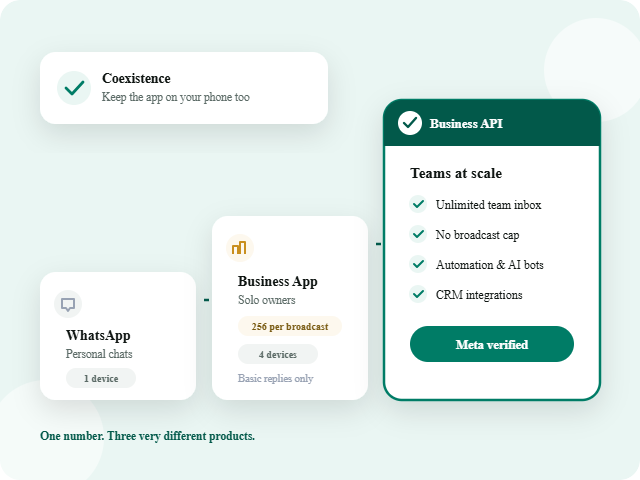
WhatsApp vs. WhatsApp Business App vs. WhatsApp Business API
Three different products, all under the WhatsApp name - here's what actually separates them.
| WhatsApp Business App | WhatsApp Business API | ||
|---|---|---|---|
|
Built for |
Personal, one-to-one chats |
Solo owners & small shops |
Teams and growing businesses |
|
Interface |
Phone app |
Free phone app |
Web dashboard (like GreenTick) |
|
Team access |
One device signed in at a time |
Up to 4 linked devices, one primary |
Unlimited team members, no phone needed |
|
Broadcast limit |
Not available |
Up to 256 contacts per list |
No fixed cap – scales with your quality rating |
|
Automation |
None |
Basic quick replies & greeting messages |
Full workflows: triggers, conditions, AI bots |
|
Message templates |
Not applicable |
Not required for personal chats |
Required to message first, reviewed by Meta |
|
Integrations |
None |
None |
CRM, e-commerce, payments, custom systems |
|
Catalog & commerce |
Not available |
Basic catalog |
Full catalog, cart, and order management |
|
Pricing |
Free |
Free |
Meta’s per-conversation rate + BSP subscription |
|
Verification |
Not applicable |
Optional basic profile |
Business Verification through Meta Business Manager |
Available Input Field Types
A Real Team Inbox
Every conversation lives in one shared screen, assignable to a specific person or an AI agent, so nothing gets missed and no one's guessing who replied.
Broadcasts That Actually Scale
Send to your full contact list, not a 256-contact ceiling, with delivery tracked in real time - Sent, Delivered, Read, Replied.
Automation That Runs Itself
Trigger, condition, action - build workflows that reply, route, or follow up around the clock without a person online.
Catalog & In-Chat Checkout
Customers browse, ask, and order without ever leaving the conversation or getting redirected to a website.
Official Business Verification
Your number is tied to a verified Meta Business Account - the same trust signal customers look for before engaging with a brand on WhatsApp.
Real Analytics
Delivery and read rates, response times, campaign performance - the reporting the free app was never built to give you.
The Question Everyone Asks
Do You Lose WhatsApp on Your Phone After Switching?
Historically, yes - this is the single most common concern businesses have, and it used to be a real trade-off.
Getting Started
How Businesses Actually Get WhatsApp API
The short version - full walkthrough linked below.
1️⃣
Meta Business Portfolio
Create or use an existing one – this is where the WhatsApp account lives.
2️⃣
Business Verification
Meta confirms your business is real, usually within a few hours.
3️⃣
Connect Your Number
New, existing (via Coexistence), or a free virtual number – your choice.
4️⃣
Start Messaging
Build a template, send a test message, and you’re live.
GreenTick walks through every click of this – see the full setup guide.
Cost
How WhatsApp API Pricing Works
Meta charges per conversation, not per message - and the rate depends on why you're messaging. Every 24-hour conversation window falls into one of three categories:
Promotions and offers. Highest rate, most restrictions.
Order and account updates. Usually the cheapest, fastest to approve.
OTPs and login codes. Charged even inside a free window.
On top of Meta’s rate, a BSP like GreenTick charges a software subscription for the dashboard, automation, and support – see the full pricing breakdown.
Good to Know
Straight From Meta
Official Documentation
Meta’s own overview of the WhatsApp Business Platform covers the fundamentals GreenTick is built on – message templates, quality ratings, and how account verification actually works. Worth reading once, independent of any BSP’s marketing.
Use Cases
Who Actually Uses WhatsApp API
FAQs
Frequently Asked Questions
What is WhatsApp API?
Meta’s platform for businesses to send and receive WhatsApp messages through software instead of a phone app, accessed through a BSP dashboard like GreenTick API, built for teams and automation rather than one person typing replies.
Is WhatsApp API free?
The API itself has no license fee from Meta, but you pay per conversation based on category (Marketing, Utility, Authentication), and typically pay your BSP a software subscription for the dashboard and tools.
What's the difference between WhatsApp Business API and the WhatsApp Business App?
Can I use my existing WhatsApp number, or do I need a new one?
Either works. Bring your existing number over using Coexistence to keep it active on your phone too, or start fresh with a new number, including a free virtual number if you don’t need a SIM at all.