
GreenTick AI Bot · Official WhatsApp API
A WhatsApp AI Chatbot That Learns From Your Own Chats.
Your AI bot answers customers on WhatsApp day and night, across your whole live chat or only in the chats you pick. Connect the GreenTick MCP server and it reads your past conversations, then trains itself on how your team actually replies.
24/7
answers, even after hours
2 ways
whole inbox or one chat
0%
markup on Meta charges
What is a WhatsApp AI chatbot?
An assistant that answers your customers, then knows when to step aside.
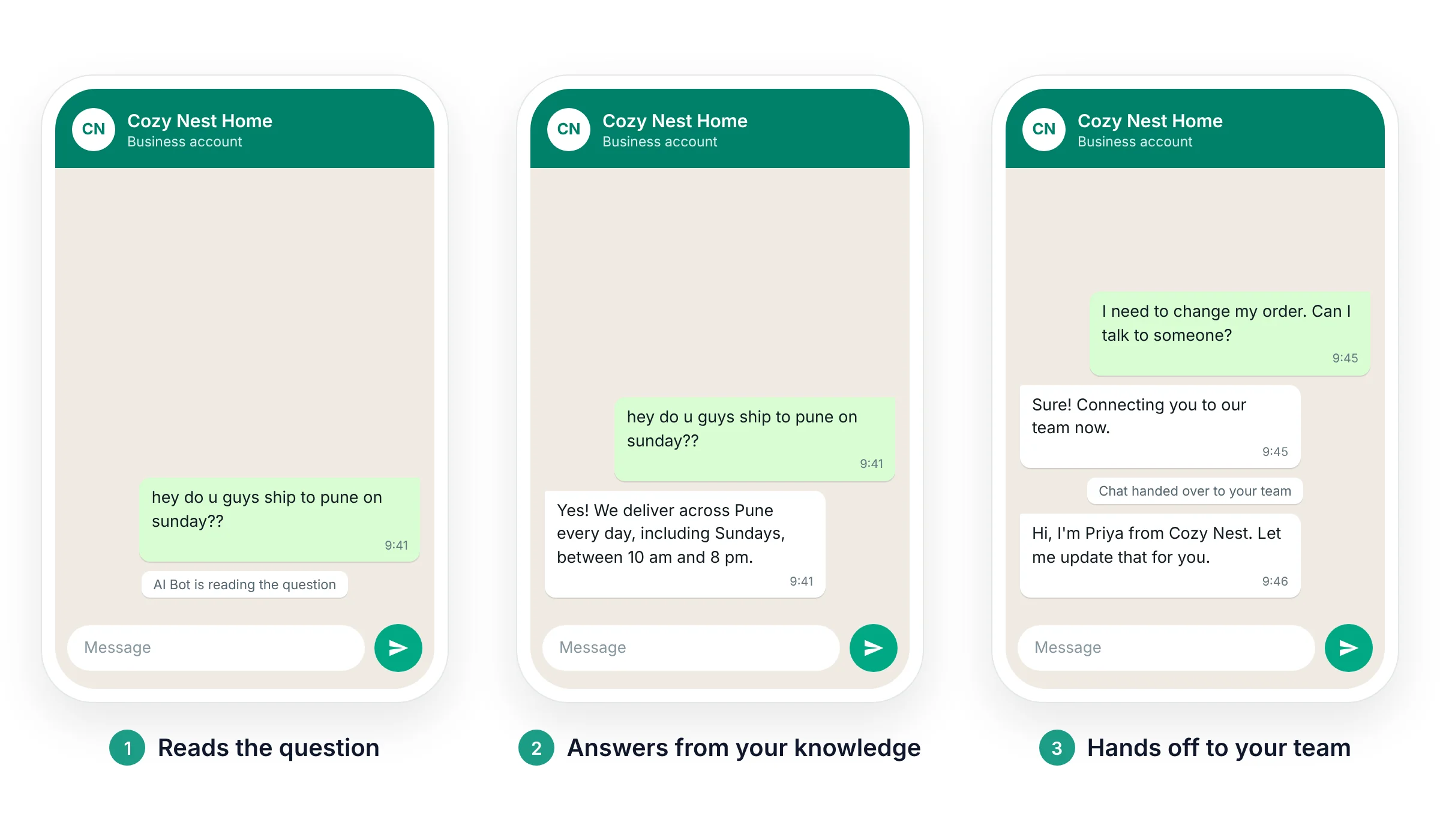
A WhatsApp AI chatbot is an AI agent connected to your WhatsApp Business number through the Official WhatsApp API. It reads each customer message, replies using only the knowledge and instructions you give it, and passes the chat to a real person when it can't help.
1. It reads the question
Customers type the way they talk. The bot understands what they mean, not just the keywords.
2. It answers from your knowledge
Replies come from your products, policies and FAQs, in the tone you set.
3. It hands off to your team
When a customer asks for a person, or the bot can't help, the chat moves to your team.
You stay in control: you choose the AI model it runs on, such as GPT-4o mini, write the rules it follows, and decide which chats it answers.
Two ways to use it
Let it run your whole live chat, or only the chats you pick.
Start wide or start small. You can switch any time.
Option 1
CN
New chat
Hi! What are your store timings?
Answered by AI Bot
We're open 10 am to 9 pm, Monday to Saturday. Anything else I can help with?
Message
Across your whole live chat
Turn on Default agent for new chats and the bot picks up every new conversation in your Shared Team Inbox. Your team steps in only when the bot hands a chat over.
Option 2
CN
Chat assigned to AI Bot
Is the blue sofa back in stock?
Yes, the 3-seater in blue is back. Want me to share the delivery timeline?
Yes please
Message
In individual chats
Once your bot is trained, assign it to one specific conversation. It handles that chat on its own, while your team keeps working on the rest.
The most important part
The MCP server trains your bot on your own chats.
Writing the perfect bot instructions by hand is slow, and you always miss something. GreenTick's MCP server does that work for you: it connects your WhatsApp account to an AI assistant, reads your past conversations, and turns them into your bot's training.

How the training works
1
Connect the GreenTick MCP server
Add it to Claude or another MCP-compatible AI assistant, and sign in with your GreenTick account.
2
It reads your chats
It goes through the conversation history in your WhatsApp inbox.
3
It learns from them
It picks up the questions customers ask most, the answers your team gives and the tone you use.
4
Your bot gets trained
It updates your AI bot's knowledge and instructions automatically. Test the bot, then let it go live.
New to MCP? Read what a WhatsApp MCP server is.
Example: Claude, connected to the GreenTick MCP server
Read our WhatsApp chats from the last 3 months and train our support bot on them.
Done. I read your recent conversations, found the questions customers ask most and how your team answers them, and updated your AI bot's knowledge and instructions. Want to run a test chat before it goes live?
Yes, run a test.
Side by side
Training by hand vs training with the GreenTick MCP server
By hand
With GreenTick MCP
Where the knowledge comes from
Whatever you remember to write down
Your real past conversations
Effort to set up
Hours of writing and rewriting instructions
One request to your AI assistant
Sounding like your brand
Generic until you tune it
Learns how your team already replies
New questions customers ask
Missed until you notice and add them
Picked up the next time it reads your chats
Keeping it up to date
You edit the instructions by hand
Ask it to retrain whenever you want
What it can do
The questions your team answers ten times a day, handled.
Answer common questions
Prices, timings, delivery areas, return policies: anything in your knowledge base.
Reply after hours
A customer who writes at 11 pm gets an answer right away, not the next morning.
Qualify new leads
Ask the right questions first, so your sales team picks up chats that are ready to buy.
Collect details upfront
Get the order number or the requirement before a person joins, so nobody asks twice.
Hand off cleanly
When a customer asks for a person, it sends your handoff message and the chat moves to your team.
Stay consistent
Every customer gets the answer your team would give, in the same tone, every time.
Built to Meta's rules
A business AI bot, not a general chatbot.
Since January 15, 2026, Meta's WhatsApp Business Solution Terms bar general-purpose AI assistants, the ChatGPT-style bots that answer anything, from the WhatsApp Business Platform. A bot that serves your own customers, answers from your knowledge and hands off to a person is the kind Meta allows.
Your knowledge only
It answers questions about your business, from the knowledge base you give it.
A person is always one step away
The handoff to your team is built in, not an afterthought.
Official WhatsApp API
Every message goes through GreenTick, a Meta Tech Provider, built to Meta's rules.
Read the source: WhatsApp Business Solution Terms, section on AI providers.
Get started
Set up your WhatsApp AI chatbot in 5 steps.
Build it in the GreenTick dashboard, then let the MCP server train it on your chats.
1
Click New Agent
Open AI Bot from the sidebar and click New Agent.
2
Name it and pick a model
Give it a name and a type, then choose the model it runs on, such as GPT-4o mini.
3
Write the system prompt
Tell it what it can and can't do. Keep it to your knowledge base.
4
Set the handoff message
Write what customers see when they're connected to a real person.
5
Enable it and save
Turn on Enabled, and Default agent for new chats if you want it on every new chat.
FAQs
Everything people ask about WhatsApp AI chatbots.
How does the WhatsApp AI chatbot learn from my chats?
Through GreenTick's MCP server. Connect it to an MCP-compatible AI assistant such as Claude and ask it to train your bot. It reads your past WhatsApp conversations, learns the questions customers ask and how your team answers them, and updates your bot's knowledge and instructions.
Do I need to know coding to train the bot?
No. Connecting the MCP server takes a few clicks and a sign-in with your GreenTick account. After that, you give instructions in plain English.
Can the AI bot reply to every chat in my live chat?
Yes. Turn on Default agent for new chats and it answers every new conversation in your Shared Team Inbox. Your team takes over whenever the bot hands a chat off.
Can I use the AI bot only in some chats?
Yes. Once it is trained, assign it to an individual conversation. It handles that chat while your team handles the rest.
Will the bot make up answers?
It is instructed to answer only from your knowledge base and the rules in its system prompt, and to hand off when it can't help. Like any AI, test it before it goes live and review the chats it handles.
What is the difference between an AI chatbot and keyword automation?
Keyword automation sends a fixed reply when a message matches a keyword you set. An AI chatbot understands questions in the customer's own words and writes a reply from your knowledge. Many businesses use both: automation for fixed flows, the AI bot for open questions.
Does the AI chatbot work outside business hours?
Yes. Once it is enabled, it replies whenever a message arrives, day or night. Any chat it hands off waits in your team inbox for the next person available.
How much does a WhatsApp AI chatbot cost?
Meta charges per message. Replies inside the 24-hour customer service window are billed as service messages, which Meta has charged per message since October 1, 2026. GreenTick adds 0% markup on Meta charges. See pricing for plan details.
Which AI assistants work with the GreenTick MCP server?
MCP is an open standard, so any assistant that supports MCP connectors can use it. Claude supports MCP natively, which makes it the easiest place to start.
Everything you need to grow on WhatsApp, in one place.
AI Bot works alongside the rest of GreenTick, all on the Official WhatsApp API.
AI Chatbot
Shared Team Inbox
Automations
Bulk Broadcast
Template Manager
WhatsApp Flows
Catalog
Google Sheets integration