
WhatsApp Group Member Limit: Everything That Changed in 2026
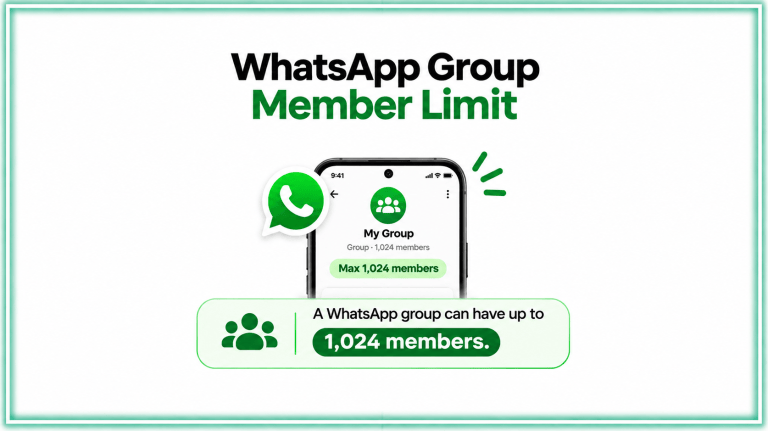
Table of Contents
Introduction
You added an admin to help manage your 980-member reseller group. The next week, two senior members asked why they were removed to make space. You explained. They did not come back. That is the real cost of a 1,024-member ceiling – not a number problem, a relationship problem.
WhatsApp confirmed on November 19, 2026 that it has raised the WhatsApp group member limit from 1,024 to 1,500 members for both Android and iPhone users. The update is rolling out now, with no action required from group admins.
Here is what changed, what it means for businesses running large communities and broadcast-style groups, and where group messaging still has hard limits that the new number does not fix.
What Is the New WhatsApp Group Member Limit?
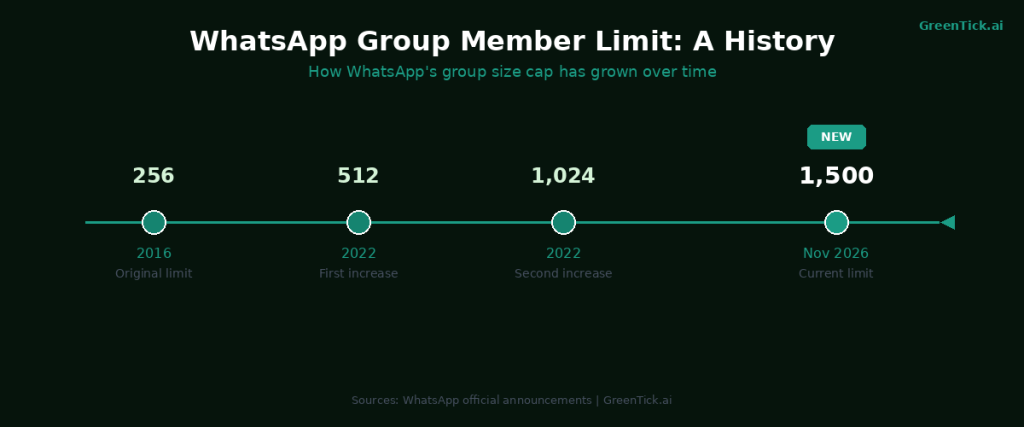
WhatsApp groups now support up to 1,500 members, up from the previous cap of 1,024. The change applies to all standard WhatsApp group chats on Android and iOS. No additional settings need to be changed and existing groups are not affected retroactively – groups that were already at or near 1,024 members can now add more participants up to the new ceiling.
This is not the first time WhatsApp has raised this limit. The original cap was 256 members when group chats launched. WhatsApp raised it to 512 in 2022 and then to 1,024 shortly after. The jump to 1,500 follows that same pattern: as more businesses and communities rely on WhatsApp for coordination, the platform responds by expanding capacity.
WhatsApp Communities, which is a separate feature that groups multiple related group chats under one umbrella, still allows up to 2,000 members per individual group within a community. That figure has not changed with this update.
How to Check If Your Group Supports 1,500 Members
The update is a server-side rollout, which means no app update is required. Here is how to confirm your groups have received it:
- Open WhatsApp on Android or iPhone.
- Open any existing group chat.
- Tap the group name at the top to open Group Info.
- Scroll to the participants section. If the update has reached your account, the displayed limit will show 1,500.
- If your group shows 1,024 as the maximum, the rollout has not reached you yet. It typically completes within a few days of a server-side push.
If you are an admin trying to add participants and hitting a wall at 1,024, wait 24 to 48 hours and try again. Force-closing and reopening the app can sometimes prompt a sync.
What Changed and What Did Not
The 1,500-member limit applies specifically to standard WhatsApp groups. Several related features have their own caps that remain unchanged:
| Feature | Previous Limit | Current Limit |
|---|---|---|
| Standard WhatsApp group | 1,024 members | 1,500 members |
| Group within a WhatsApp Community | 2,000 members | 2,000 members |
| WhatsApp broadcast list | 256 contacts | 256 contacts |
| WhatsApp group video call | 32 participants | 32 participants |
| WhatsApp group voice call | 32 participants | 32 participants |
| Message forwarding limit | 5 chats | 5 chats |
The broadcast list cap at 256 contacts has not moved. If you are using broadcast lists to send messages to opted-in customers, you are still capped at 256 per list. The workaround most businesses use is creating multiple lists, but that creates management overhead and inconsistent delivery tracking.
Who Actually Benefits From the 1,500 Limit
For most personal users, this change is invisible. The majority of personal WhatsApp groups have fewer than 100 members.
The update has real practical value for specific use cases:
- Reseller and distributor networks. Many brands in India, Southeast Asia, and West Africa run product distribution through large WhatsApp groups. A network of 1,200 dealers that previously required two overlapping groups can now be managed in one.
- Education communities. Coaching institutes, university departments, and study groups that grew past 1,024 members had to split cohorts across multiple groups and cross-post announcements manually. A single 1,500-member group removes that overhead.
- Local government and civic groups. Municipal ward groups, resident welfare associations, and local election coordination teams in densely populated areas routinely hit the old ceiling.
- Event organizers. Conference attendees, festival participant groups, and sports club networks that grew past 1,024 no longer need to divide registrants across parallel groups with separate admins.
- Religious and cultural organizations. Many diaspora communities rely on WhatsApp for coordination across time zones. Groups that had to split congregation lists can reunify them.
For businesses with more than 1,500 contacts they want to reach, the group limit increase still does not solve the core problem. A 1,500-member group has no delivery confirmation, no opt-in record, no link tracking, no template approval and no campaign analytics. For that use case, the answer is the Official WhatsApp API, not a bigger group.
What Most People Get Wrong About WhatsApp Group Limits
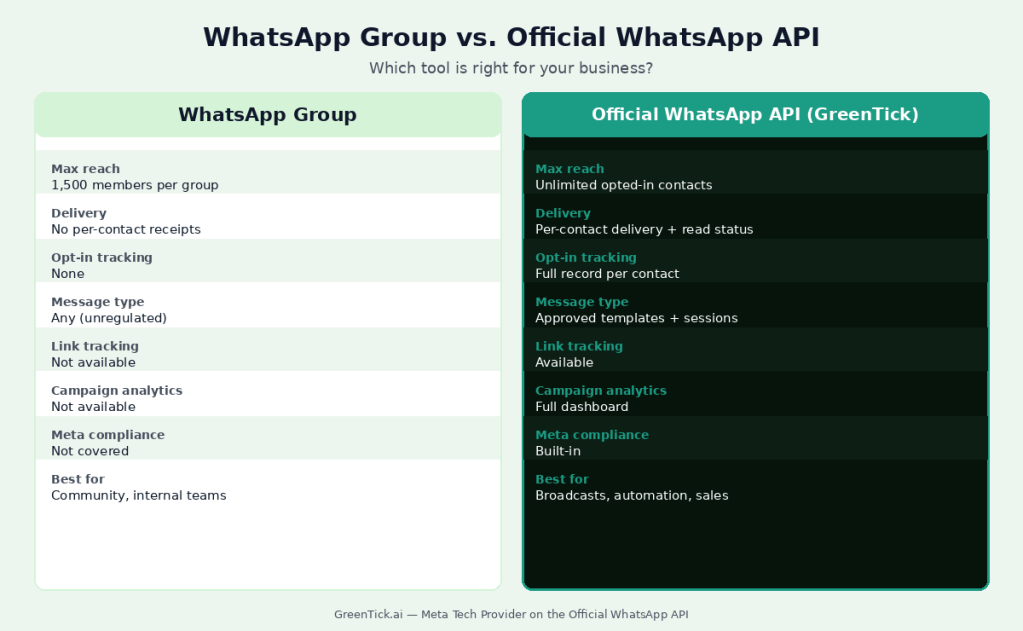
The most common mistake after a limit increase is assuming the new number is the ceiling for business messaging. It is not.
A WhatsApp group is a conversation tool. Everyone in the group can see every message, every reply and every member. For businesses, this creates real problems:
- A customer’s complaint is visible to 1,499 other members.
- A bulk announcement goes out without any delivery receipt per contact.
- There is no way to know who read the message and who did not.
- Contacts can leave, mute or archive the group at any time without you knowing.
- Group chats are not covered by Meta’s business messaging policies and do not use approved templates.
The confusion is understandable. WhatsApp groups feel like a broadcast tool because they reach a lot of people at once. But they are fundamentally a shared inbox, not a campaign channel.
Businesses that need to send personalized messages to opted-in contacts, track delivery and read rates, run follow-up automations and stay inside Meta’s compliance framework need the Official WhatsApp API – where there is no group size ceiling because messages go directly to individual contacts.
If your business is running product announcements, order updates, appointment reminders or promotional campaigns through a WhatsApp group and hitting a wall at 1,024 (or now 1,500), the limit is not the actual problem. The tool is.
How Businesses Use WhatsApp Groups Alongside the API
Groups and the Official WhatsApp API are not in competition. Businesses that use WhatsApp well typically use both for different jobs.
- Where groups work well: Internal team coordination, real-time sales team updates, vendor negotiation threads, community-building around a product (a user group for feedback, a beta testing channel, a loyalty community for existing customers).
- Where the API works: Customer notifications, marketing broadcasts, automated follow-ups, appointment reminders, cart recovery messages, lead qualification flows, support ticket updates – anything that needs to go to specific opted-in individuals with a record of delivery.
A business running a WhatsApp API campaign might send 50,000 personalized messages in a morning and use a 200-member WhatsApp group that same day for the sales team debrief. The two tools answer different questions.
The 1,500 limit increase makes the community-building use case more practical. A product community or customer loyalty group that had to be split across two groups at 1,024 can now run as one, which keeps conversations more coherent and reduces admin load.
If your business is at a stage where the API makes sense, GreenTick connects you to the Official WhatsApp API as a Meta Tech Provider, with broadcasts, automation, a shared team inbox and campaign analytics. If you have been sending bulk WhatsApp messages without getting banned through groups and want a more reliable, trackable approach, the API is the upgrade path. You can start a free trial and have your first broadcast live the same day.
The WhatsApp Community Feature vs. Standard Groups
WhatsApp Communities deserve a separate mention because they are frequently confused with standard groups and because the limit numbers differ.
A WhatsApp Community is a parent container that can hold up to 50 groups plus an announcement channel. Each group within a community can have up to 2,000 members. The announcement channel (accessible to all community members) also supports up to 5,000 members.
Standard groups at 1,500 members are separate from the Community structure. You do not need to create a Community to use the new 1,500-member limit. Communities are designed for organizations that want to manage multiple related groups (a school with separate class groups, a company with department groups) under one admin umbrella with a shared announcement channel.
The key difference for businesses: a Community is still a group chat product. The same delivery, opt-in and tracking limitations apply. For outbound business messaging at scale, the Official WhatsApp API remains the correct tool regardless of whether you use groups or communities.
WhatsApp raised the group limit to keep up with how communities naturally grow. That is a good thing. It just does not change what groups are built for.
Conclusion
WhatsApp’s move from 1,024 to 1,500 is a practical fix for communities that were splitting groups to manage the overflow. For businesses that have been treating large groups as a broadcast channel, the number change does not change the underlying limits: no delivery receipts, no opt-in records, no campaign analytics. Build the community in the group; run the campaigns through the API.
WhatsApp Group Member Limit FAQs
What is the WhatsApp group member limit now?
As of November 2026, the WhatsApp group member limit is 1,500 members for standard group chats on Android and iPhone. This was raised from the previous limit of 1,024. No app update is required and the change rolls out automatically to all users.
When did WhatsApp raise the group limit to 1,500?
WhatsApp confirmed the increase on November 19, 2026. The rollout is server-side, meaning most users will see the new limit within 24 to 48 hours without updating the app.
What was the WhatsApp group member limit before 1,500?
The previous limit was 1,024 members. Before that, WhatsApp supported 512 members per group, and the original cap when group chats launched was 256.
Is the 1,500 limit the same for the WhatsApp Business app?
It depends on which MCP Server you use. Personal MCP Servers that connect through WhatsApp Web carry the same risk as other unofficial tools. A Business API MCP from a Meta Tech Provider like GreenTick goes through the Official WhatsApp API, which means every action is built to Meta’s rules and your number carries far lower ban risk.
Which AI assistants work with WhatsApp MCP Servers?
Yes. The 1,500-member limit applies to both the standard WhatsApp app and the WhatsApp Business app. If you run a group from a Business account, the same ceiling applies.
Does the WhatsApp Communities limit also increase to 1,500?
No. WhatsApp Communities already allowed up to 2,000 members per individual group within a community structure. That figure has not changed. The 1,500 limit update applies only to standard group chats outside of Communities.
Can I add more than 1,500 people to a WhatsApp group?
No. 1,500 is the hard ceiling for standard groups. If you need to reach more than 1,500 people on WhatsApp, you can create multiple groups, use a WhatsApp Community (up to 2,000 per group and 50 groups per community), or use the Official WhatsApp API, which sends messages directly to individual opted-in contacts with no group size ceiling.
Is a WhatsApp group the right tool for business marketing?
For community-building, internal coordination and customer loyalty groups, yes. For marketing campaigns, promotional broadcasts, transactional messages and anything that needs delivery tracking, opt-in management or compliance with Meta’s business messaging policies, the Official WhatsApp API is the right tool. GreenTick connects businesses to the API as a Meta Tech Provider – start a free trial or book a demo.