
WhatsApp on Apple Watch: What You Can Do and How to Set It Up

Table of Contents
Introduction
For years, the answer to “can I use WhatsApp on my Apple Watch?” was a frustrated workaround. Mirror your notifications, scan a QR code, download a third-party app, hope it works. In November 2025, that changed completely. WhatsApp launched its first official native app for Apple Watch, and most of the articles you will find online still have not caught up with that. This one has.
WhatsApp Apple Watch Setup: What Actually Changed in November 2025
Before November 2025, WhatsApp on Apple Watch meant one thing: notification mirroring. Your iPhone would push a notification to your wrist, you could read the first line, tap a quick reply or an emoji, and that was the extent of it. There was no app. There was no chat list. You could not scroll back, search, browse conversations, or record a voice message from your Watch.
That changed when WhatsApp officially launched its native Apple Watch app in November 2025. The app supports reading full messages, call notifications, voice messages, emoji reactions, images and stickers, and chat history, all directly from the wrist.
The app works as a companion to a connected iPhone. Once your Apple Watch is paired with an iPhone that has WhatsApp installed, the app syncs automatically. No QR code scanning is required. If you have Automatic Downloads turned on in your Apple Watch settings, it may have already installed itself without you noticing.
This is not a minor update. For anyone who runs, commutes, works in meetings, or simply wants to leave their phone in their bag without missing important messages, this is the WhatsApp experience Apple Watch should have had years ago.
Does Your Apple Watch Support the WhatsApp Apple Watch Setup?
Before installing, check the requirements. WhatsApp for Apple Watch works on any Apple Watch Series 4 or later, including the Apple Watch SE and SE 2, provided the watch is running watchOS 10 or newer. The original Apple Watch, Series 1, Series 2, and Series 3 are not supported. You also need iOS 9.1 or newer on your iPhone, along with the latest version of WhatsApp for iOS.
The supported models in plain terms:
- Apple Watch Series 4, 5, 6, 7, 8, 9, 10, Ultra, Ultra 2, Ultra 3
- Apple Watch SE (1st generation, 2nd generation)
- watchOS 10 or later required
If you are unsure which watchOS version you are running, open the Watch app on your iPhone, tap General, then Software Update.
How to Set Up WhatsApp Apple Watch in 3 Steps
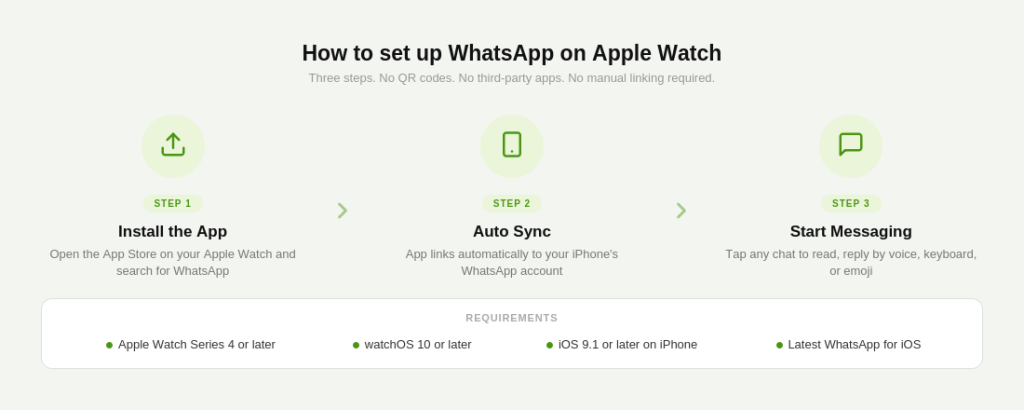
The setup is straightforward. No QR codes, no third-party tools, no hacks.
- Open the App Store on your Apple Watch directly and search for WhatsApp. Alternatively, open the Watch app on your iPhone, tap App Store, and install WhatsApp from there. If you have Automatic Downloads enabled, it may already be installed.
- Once installed, the WhatsApp app on your Apple Watch syncs automatically with your iPhone’s WhatsApp account. Open the app on your Watch and your recent conversations will appear immediately.
- Tap any conversation to read it and reply. You can dictate a reply using your voice, use the QWERTY keyboard if you have Series 7 or newer, send an emoji, or choose from quick reply suggestions.
That is the full setup. No pairing codes, no linking sessions, no separate account needed. The Watch app is tied directly to your iPhone’s WhatsApp account.
What You Can Do With WhatsApp Apple Watch Setup
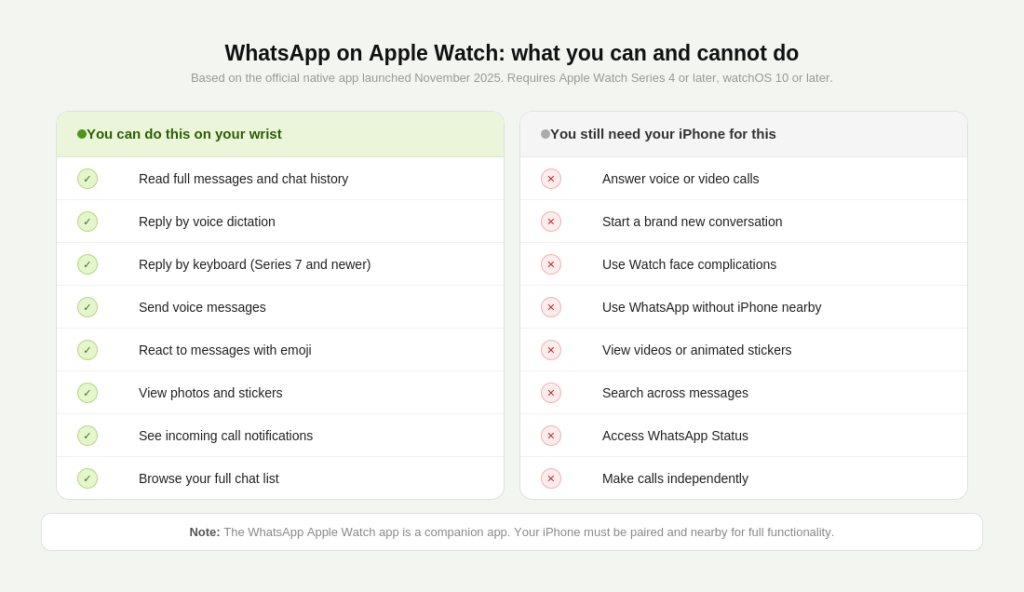
The official native app is a significant step up from notification mirroring. You can now browse your full chat list, read chat history by scrolling back through recent messages, reply using the full QWERTY keyboard on Series 7 and newer, dictation, emoji, or pre-set quick replies, and record and send new voice messages directly from your Watch.
Beyond replying, the app supports call notifications showing who is calling, full-length messages even in long threads, voice message playback, emoji reactions, clear images and stickers, and access to recent chat history.
The app also includes connectivity indicators so you can see when it is syncing or when iPhone connectivity is lost, which is useful during workouts when your phone is in a bag or another room.
All of this uses WhatsApp’s standard end-to-end encryption. Your messages are just as private on your Watch as they are on your phone.
What WhatsApp Apple Watch Setup Still Cannot Do
The native app is a genuine improvement but it does have real limitations, and being honest about them saves frustration.
You cannot answer voice or audio calls from the Watch. While you receive a call notification on your wrist, the only option shown is to decline. To answer, you still need your iPhone. The app also does not let you initiate a new chat from your Watch. You can only continue existing conversations, not start a thread with a new contact. There are no Watch face complications either, so you cannot launch WhatsApp from a shortcut on your watch face and must go through the app drawer instead.
Videos and animated stickers also do not play on the Watch display. Static images and regular stickers load fine, but anything animated stays blank. Audio playback quality through the Watch’s small speaker is usable but noticeably lower than your iPhone or AirPods.
The app is also not standalone. It requires your iPhone to be nearby and connected. If your phone is out of range, you can read already-loaded messages but cannot send new ones until the connection is restored.
What Most People Get Wrong About WhatsApp Apple Watch Setup
The most common mistake people make is still following guides written before November 2025, which send them down the notification-mirroring or WatchChat 2 route.
For years, the only way to get a fuller WhatsApp experience on Apple Watch was to use paid, third-party apps like WatchChat 2, which relied on a QR code workaround through WhatsApp Web. With the launch of Meta’s official native app, these third-party apps are no longer necessary. The native app is more reliable, more secure using end-to-end encryption, and offers a significantly cleaner user experience.
If you have WatchChat 2 or Chatify installed, you can uninstall them. The official app replaces both, without the subscription cost and without the QR re-linking that third-party apps require every few weeks.
The second common mistake is assuming the Watch app works like a standalone device. It does not. You cannot leave your iPhone at home and use WhatsApp on your Watch independently. The Watch app is a companion, not a replacement. For a genuinely phone-free WhatsApp experience, third-party apps like Blaze Messenger take a different technical approach, maintaining their own server connection, but that comes with its own tradeoffs and costs.
For most people, the official app is everything they actually need. A quick reply during a meeting, a voice message on a run, a reaction to a group chat while cooking. It handles all of that well.
How to Control WhatsApp Apple Watch Notifications
If you find the Watch buzzing too often once the app is installed, you have full control over notification behaviour.
If you want to mirror your phone’s alerts without the full app experience, you can adjust this in the Watch app on your iPhone. Go to My Watch, tap Notifications, scroll to WhatsApp, and toggle Mirror iPhone Alerts on or off.
You can also mute individual chats directly on the Watch by pressing and holding a conversation in the chat list. Group chats in particular can generate a lot of noise, and muting them on the Watch while keeping them active on your phone is a clean way to manage this.
For businesses using WhatsApp Business API to send customer notifications, a quick note: those messages appear on the Watch exactly as they do on iPhone, as long as the customer has the official WhatsApp app installed and notifications enabled. There is no separate configuration needed on the business side.
If your business runs broadcast campaigns through GreenTick.ai, the messages your customers receive from those campaigns will reach their Apple Watch the same way any WhatsApp message does, instantly, with full notification and reply capability.
Conclusion
Most of the internet still tells you WhatsApp on Apple Watch is a workaround story. It stopped being one in November 2025. Install the app, pair it, and your wrist becomes a real messaging tool, not just a notification screen.
Frequently Asked Questions About WhatsApp Apple Watch Setup
Is there an official WhatsApp app for Apple Watch?
Yes, as of November 2025. WhatsApp launched its first native Apple Watch app, which supports reading messages, replying by voice or keyboard, sending voice messages, reacting with emoji, and viewing images and stickers. It works on Apple Watch Series 4 or newer running watchOS 10 or later.
How do I set up WhatsApp on Apple Watch?
Open the App Store on your Apple Watch and search for WhatsApp, or install it through the Watch app on your iPhone. Once installed, it syncs automatically with your iPhone’s WhatsApp account. No QR code or manual linking is required.
Can I use WhatsApp on Apple Watch without my iPhone nearby?
No. The official WhatsApp Apple Watch app is a companion app and requires your iPhone to be connected and nearby to send new messages. You can read already-loaded conversations offline, but outgoing messages need the iPhone connection.
Can I answer WhatsApp calls on Apple Watch?
You can see who is calling and decline the call from your Watch, but you cannot answer WhatsApp voice or video calls on the Watch. To answer, you still need your iPhone.
Do I still need WatchChat 2 or Chatify for WhatsApp on Apple Watch?
No. Since the official WhatsApp app launched in November 2025, third-party apps like WatchChat 2 and Chatify are no longer necessary. The native app is free, more secure using end-to-end encryption, and does not require repeated QR code relinking.
Which Apple Watch models support the WhatsApp app?
Apple Watch Series 4 and all newer models are supported, including the SE and SE 2. The original Apple Watch, Series 1, Series 2, and Series 3 are not supported. Your Watch must run watchOS 10 or later.
What can I do with WhatsApp on Apple Watch?
You can read full messages and chat history, reply by voice dictation or keyboard (Series 7 and newer), send voice messages, react with emoji, and view images and stickers. You cannot answer calls, start new conversations, or use Watch face complications to open the app.