
How to Use WhatsApp Without Saving a Number: 6 Methods That Actually Work in 2026
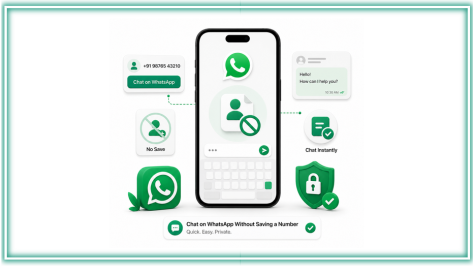
Table of Contents
Introduction
You just got a number from a delivery driver. Or a client texted you from a new number. Or you need to message a lead you met five minutes ago. The last thing you want to do is open Contacts, fill in a name, save, sync, and then find the person in WhatsApp. There has to be a faster way. There is. WhatsApp without saving a number is not just possible, there are six different ways to do it, and most people only know one.
WhatsApp Without Saving Number: What the App Now Lets You Do
WhatsApp used to require a saved contact before you could message anyone. That changed. The app now has a built-in search that lets you type a phone number with its country code directly into the search bar and start a chat immediately, no contact entry needed.
This is the cleanest answer to how to use WhatsApp without saving a number for most people in most situations. Open WhatsApp, tap the new chat icon, type the full number including country code, and if that number is registered on WhatsApp it appears under “Not in your contacts.” Tap it, and the chat opens.
But this is only one of six methods, and it is not always the fastest one depending on what you are doing and how many numbers you need to reach. The other five are below, including one that works without even opening WhatsApp.
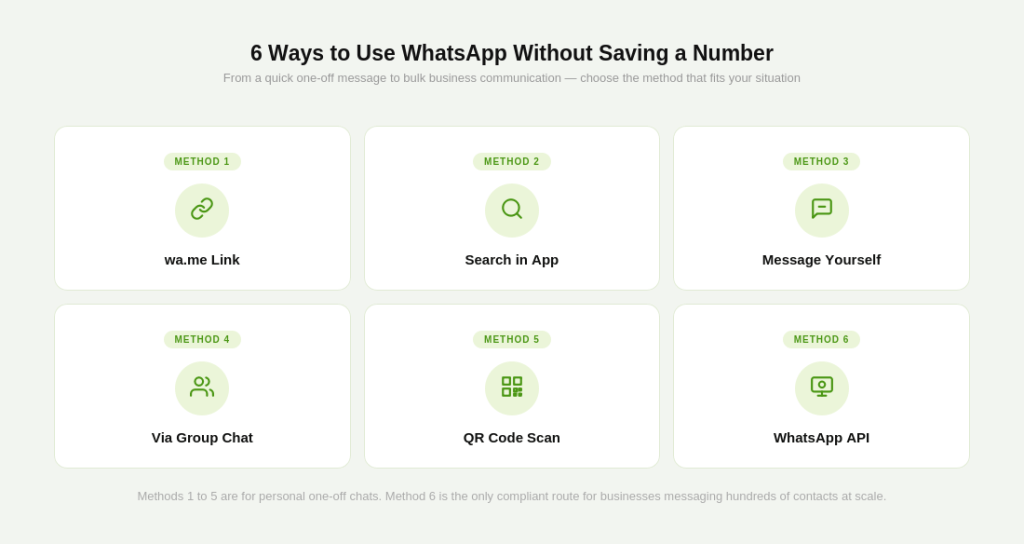
6 Ways to Use WhatsApp Without Saving a Number
Method 1: The wa.me Link (Fastest for WhatsApp Without Saving a Number)
Type this into any browser on your phone or desktop:
https://wa.me/%5Bfull number with country code]
Example for a UK number: https://wa.me/447911123456 Example for an India number: https://wa.me/919876543210
WhatsApp opens directly to a chat with that number. No saving, no searching. You can also add a pre-filled message to the link:
https://wa.me/919876543210?text=Hi%20I%20saw%20your%20listing
This is the method businesses use to build Click-to-WhatsApp links for ads, websites, and email signatures. It works on any device that has WhatsApp installed.
Method 2: Search Directly in the WhatsApp App
Open WhatsApp and tap the compose or new chat icon. In the search bar at the top of the new chat screen, type the full phone number including country code. If the number is registered on WhatsApp, it appears as “Not in your contacts.” Tap it to open the chat.
This works on both Android and iOS and requires no browser. The number must be entered in full with country code, for example +44 for UK, +91 for India, +1 for USA. Partial numbers will not return results.
Method 3: Message the Number to Yourself
This works as a bridge method when you have a number in a message, email, or document that you want to quickly open in WhatsApp.
- Copy the phone number (with country code)
- Open WhatsApp and go to your “Message Yourself” chat (tap your own name in the contacts list or search “You”)
- Paste the number and send it to yourself
- The number appears as a clickable link in the chat
- Tap it and select “Chat on WhatsApp”
A new chat with that number opens instantly. Useful when you receive numbers in emails or PDFs and want to reach someone without saving them.
Method 4: Message from a WhatsApp Group
If you are already in a WhatsApp group with someone whose number you have not saved, you can message them directly from the group without adding them to your contacts.
- Open the group chat
- Tap the person’s name or number in the member list
- Tap “Message” from their profile popup
A private chat opens with them. This method only works if you share a group with the person.
Method 5: QR Code Scan
WhatsApp generates a personal QR code for every account. Businesses, freelancers, and individuals can share their QR code on a website, in a document, or on a physical card. Anyone who scans it opens a chat directly, with no number saving required on either side.
To find your WhatsApp QR code, open WhatsApp, tap Settings, then tap the QR code icon next to your name. You can download it, share it, or display it digitally.
For businesses, QR codes on packaging, menus, storefronts, and social profiles are a clean way to let customers start conversations without any friction.
Method 6: WhatsApp Business API for Sending to Unsaved Numbers at Scale
The five methods above all solve the personal use problem: you want to message one unsaved number quickly. They do not solve the business problem: you need to message five hundred customers and cannot save all of them.
For scale, the only compliant solution is the WhatsApp Business API. Unlike the free WhatsApp Business App which still requires contacts to have your number saved to receive broadcasts, the API lets you send approved message templates to opted-in contacts directly, with no manual contact saving on your end.
This is covered in detail in the next section.
How WhatsApp Without Saving Number Works for Businesses at Scale
For a business handling customer communication at any real volume, saving numbers is not just inconvenient, it is a structural problem. A delivery company cannot save 500 customer numbers each morning. An e-commerce brand cannot manually save every new order customer before sending a shipping update. A real estate firm cannot save every lead from a Facebook ad before following up.
The WhatsApp Business API resolves this at the infrastructure level. You upload your contact list via CSV or connect your CRM directly. The API sends approved message templates to those contacts without your team ever touching a contacts list. Recipients receive the message in their WhatsApp exactly like any other chat. Your team sees the replies in a shared inbox.
The key compliance requirement is opt-in. Every contact you message via the API must have explicitly opted in to receive WhatsApp messages from your business, whether through a website form, a checkout step, or an ad that initiates a WhatsApp conversation. This is not a limitation, it is what keeps delivery rates high and ensures your messages actually get read instead of reported as spam.
For businesses already using GreenTick.ai on the WhatsApp Business API, your broadcast campaigns, order notifications, and customer service replies all work without saving a single number on your phone. Everything runs through the platform dashboard.
What Most People Get Wrong About WhatsApp Without Saving a Number
The most common mistake is using a personal workaround for a business problem.
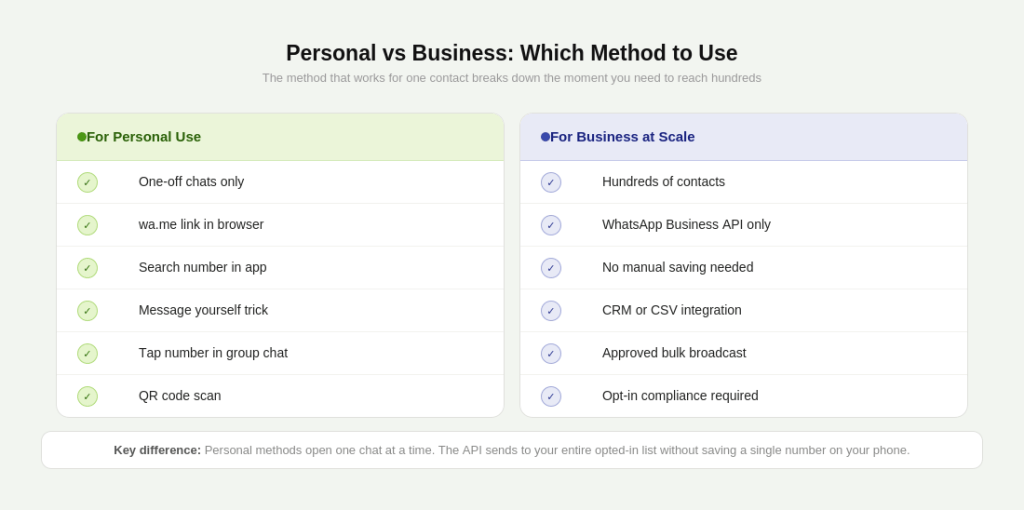
The wa.me link, the search method, and the message-to-yourself trick are all excellent for one-off contacts. They break down the moment you are dealing with more than a handful of numbers. Sending a promotional message to 200 customers using the wa.me link method means opening 200 browser tabs. That is not a workflow, it is a disaster.
The second mistake is using the free WhatsApp Business App to try to do what the API is built for. The Business App’s broadcast feature only delivers messages to contacts who have your number already saved. If your new leads have not saved your number, your broadcast does not reach them regardless of how you set it up. This is a hard platform limitation, not a settings issue.
The third mistake is trusting third-party Chrome extensions that claim to send WhatsApp messages without saving numbers at bulk. Most of these work by automating clicks inside WhatsApp Web, which violates WhatsApp’s Terms of Service and risks a permanent ban on your business number. The short-term convenience is not worth losing your primary customer communication channel.
The correct split is simple: personal contacts, use the six methods above. Business at scale, use the WhatsApp Business API through an official provider.
How to Create a wa.me WhatsApp Link Without Saving a Number for Your Business
The wa.me link is the most useful tool in this stack for businesses that want customers to message them without friction. Here is how to build it properly.
A basic link: https://wa.me/%5Byour number with country code]
A link with a pre-filled message: https://wa.me/%5Bnumber%5D?text=%5Byour message encoded for URLs]
The pre-filled message appears in the customer’s chat box when they open the link. They still have to press send, which keeps it opt-in compliant. A good pre-filled message is short and relevant to where the customer is clicking from. A restaurant might use “Hi, I would like to make a reservation” and a retailer might use “Hi, I have a question about an order.”
To make the message URL-safe, replace spaces with %20. Most URL encoder tools online handle this automatically. WhatsApp’s official click-to-chat link generator at wa.me also lets you build these links without writing the URL manually.
Once your link is ready, use it anywhere: your website header, your Instagram bio, your email signature, your Google Business profile, your Meta ads as Click-to-WhatsApp. Every click is a customer who starts a WhatsApp conversation with you without saving your number first, and without you saving theirs.
For a detailed look at how Meta Business Agent now works alongside click-to-WhatsApp flows, that blog covers the AI layer on top of these entry points.
Conclusion
Your contacts list does not have to be a record of everyone you have ever needed to message once. The wa.me link handles the one-off conversations. The WhatsApp Business API handles the business at scale. Neither requires you to save a single number.
Frequently Asked Questions About WhatsApp Without Saving a Number
Can I message someone on WhatsApp without saving their number?
Yes. The fastest way is to type https://wa.me/%5Bfull number with country code] into your browser. WhatsApp opens directly to a chat with that number. You can also search the number in the WhatsApp app’s new chat screen or message it to yourself as a clickable link.
How do I use WhatsApp without saving a number on iPhone?
Open WhatsApp, tap the compose icon in the top right, and type the full phone number including country code in the search bar. If the number is on WhatsApp, it appears as “Not in your contacts.” Tap it to start the chat. Alternatively, use the wa.me link in Safari.
How do I use WhatsApp without saving a number on Android?
Same process: open WhatsApp, tap the new chat icon, and type the full number in the search bar. On some Android devices you can also copy a phone number from any app, long-press it, and see an option to “Message via WhatsApp” depending on your device model and Android version.
Can a business send WhatsApp messages without saving customer numbers?
Yes, through the WhatsApp Business API. The API lets businesses send approved message templates to opted-in customers without saving any numbers on a phone. Everything is managed through a dashboard. The free WhatsApp Business App cannot do this at scale.
Is the wa.me link method safe to use?
Yes. The wa.me link is WhatsApp’s own official feature. Using it does not violate any WhatsApp policy. Third-party Chrome extensions and bulk sender tools that are not official API providers are a different matter and carry real account ban risk.
How do I send a WhatsApp message to multiple unsaved numbers at once?
Through the WhatsApp Business API only. The free app’s broadcast lists require recipients to have your number saved and are capped at 256 contacts. The API has no such limit and works with contacts who have not saved your number, as long as they have opted in to receive messages.
What is the wa.me link and how does it work?
wa.me is WhatsApp’s official click-to-chat URL format. When someone opens a wa.me link with a phone number in it, WhatsApp launches directly to a chat with that number, with no contact saving required. Businesses use it in ads, websites, and email signatures to let customers start conversations in one tap.